
How to create a how-to -- A sequel
Hello everyone,
It’s about time I come up with a new article – it’s been a while since my last post.
Today, I would like to talk about creating CAD tutorials - again. See it as a follow-up post to my interview with Steve Meyers, one of the contributors to the LearningExchange. Actually, the inspiration for today’s post came even before we launched LearningExchange and hit me when checking my Twitter feed a few months ago...
 I noticed a Tweet by Aaron Dietz who asked a question about Creo Elements/Direct Modeling PE. We talked a bit and I asked him if he would be up for a quick interview for this blog. Aaron writes CAD (and other technical) tutorials for high school students – definitely an interesting topic, I thought. If you agree, please read on and hear what Aaron had to say!
BG: I understand you create tutorials for schools, i.e. very young learners?
Aaron Dietz: I write and design instructional materials for Giant Campus, an online high school and course provider. Currently, I'm working on an Engineering course for which we're planning to use PTC's Creo Elements/Direct -- great software!
Many of our courses are project-based and take students through hundreds of steps to produce various projects such as CAD drawings, Web sites, audio engineering projects, computer programs, graphic design projects, and more. It's a bit like writing dozens of quick tutorials that work together to create a larger project.
BG: I would assume there are very specific things that are important to keep in mind when trying to convey technical knowledge to the kids – such as
- formal requirements (e.g.length of tutorial?, format: video or paper or both?)
- content requirements(e.g.different use of language?)
Aaron: Most of the courses I work on are about technical subjects, like Web design and CAD, so I spend a lot of my time trying to figure out ways to share technical concepts with students. Since our courses are primarily for high school students, a lot of what we do also involves making sure our courses make sense for students in high school.
That doesn't mean we turn our courses into video games or add talking animated robots or anything--mostly it means we're extra-conscientious about using a simple, straightforward, and respectful approach to instruction.
Here are some of the things we do that help:
- We use simple language. For example, we'd never use the word "utilize" because the word "use" is much simpler and works just as well. And we make sure to define the tougher technical vocabulary words that we need to use. We've even defined "horizontal" and "vertical" in a course or two, which gives you a sense of how simple we keep the language.
- We write for the Web. Our courses are presented completely online (without textbooks), so we try to make each course as friendly as possible for online readers. This involves using short paragraphs and sentences, simple and clean page layouts, consistent and instinctive navigation, and so many other things that it's hard to stop this list here.
- We use interactivity. All of our courses repeatedly give students opportunities to use what they know in an interactive exercise, which can vary from an interactive widget to a simple practice question that gives them feedback on their answer.
- We use a lot of pictures. This includes instructional images and animations that help students understand concepts. For our project-based courses, where students use software to create projects, we include screenshots of almost every mouse click. We don't use a lot of video because it takes longer for us to produce, but almost all of our courses have at least some video.
 BG: Is there a US-wide curriculum guideline to stick to?
Aaron: There isn't a U.S. standard for the types of courses we make, but there are many state standards to choose from, and we create courses that conform to one or more of those.
BG: How do you test? Do you test before publishing at all, such as show to tutorials to some kids/a test audience?
Aaron: We rely on our own in-house testing personnel, but when we introduce new features of our courses and try new things that are outside of our standard approach, we do make sure that what we're doing makes sense with real student testers.
BG: To conclude, can you give an example of your work?
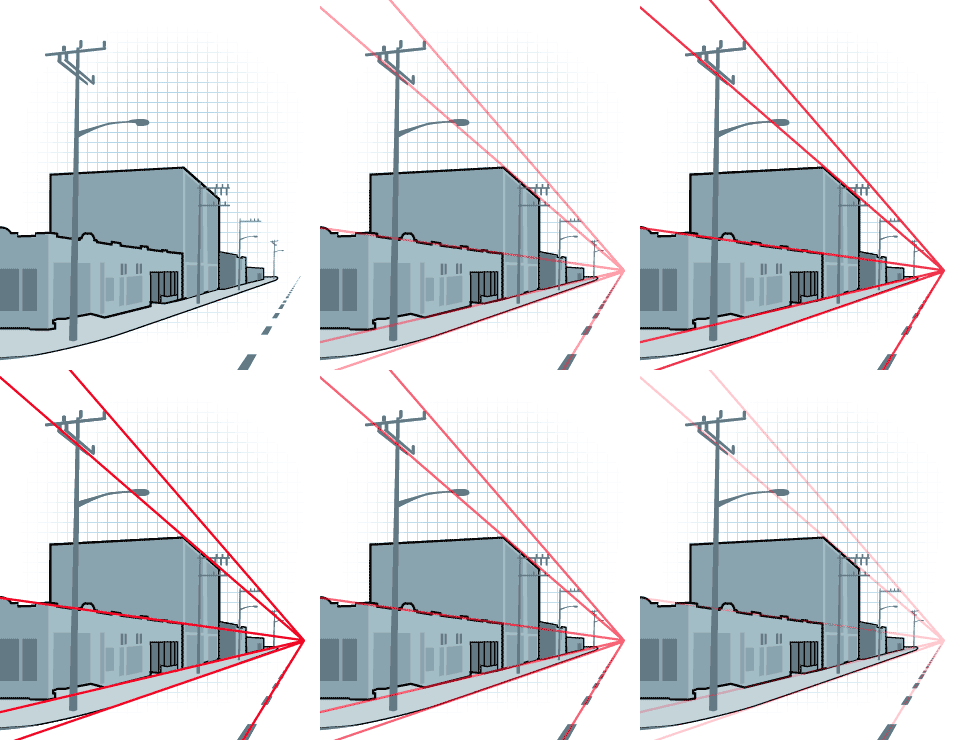
Aaron: As an example of some of the types of images and animations we use, I've included a GIF of an image illustrating the concept of construction lines in a one-point perspective drawing. I've also included an SWF of an animation from our CAD course that shows where the three views of an orthographic drawing come from.
BG: Thanks, Aaron, for taking the time to answer my questions! I am sure many of our members here on PlanetPTC Community are interested in the topic of conveying CAD and design knowledge to the next generation. For example, we have a full section dedicated to FIRST.
For those, who would like to try out Creo Elements/Direct Modeling PE, this free software edition can be downloaded here.
That’s it for today, thanks for your visit!
Bettina
PS: The image is an animated GIF. Click on the image to enlarge and see the animation.