
Unicode characters support in filenames
While testing unicode characters support in filenames (since I'm from Poland where we use them quite intensively and I was really happy to see Creo finally getting support of them) I've come across a rather unconventional behavior:
- when entering filename in all lowercase letters, all characters are converted into uppercase equivalents (as it worked since forever). All except non-ascii characters, like it's seen on screenshots.
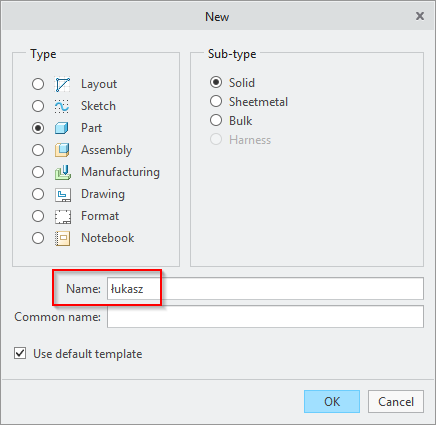

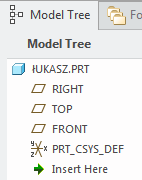
- when entering filename in all caps, everything works as expected, with every letter displayed in uppercase.
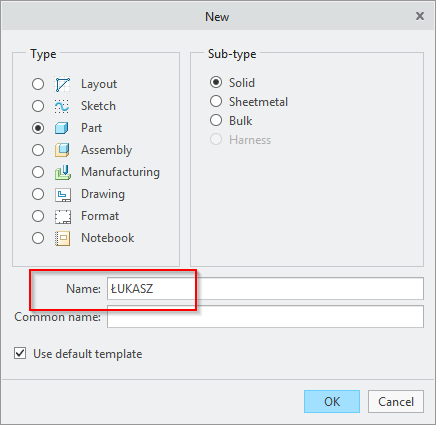

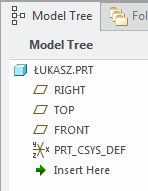
What's more, Creo considers both files as different models, while semantically both have the same name:
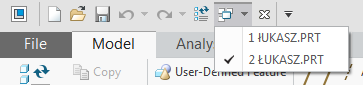
I think that can lead to potentially unwanted situations, where people will type model name with no regard for upper/lower case and in result will get two different models with what's seems to be same name. Also when saving both models from session, both are saved to the file with the same name (there is just one file łukasz.prt on disk, for example), so it can lead to situations where someone might involountarily overwrite previous model with new one.
What I'd expect when dealing with non-ascii characters is consistent behavior of converting lowercase special letters to their uppercase equivalents, so there won't be confusion in model names.