
Aug 9, 2016 5:53 PM UTC
Question

Scene Background color not changing

In the image below, the scene is set to a certain backplate color, and yet the Graphics Window in Creo is not reflecting that.  Even when I hit OK, the background is still gray. What is the use of the background color setting?
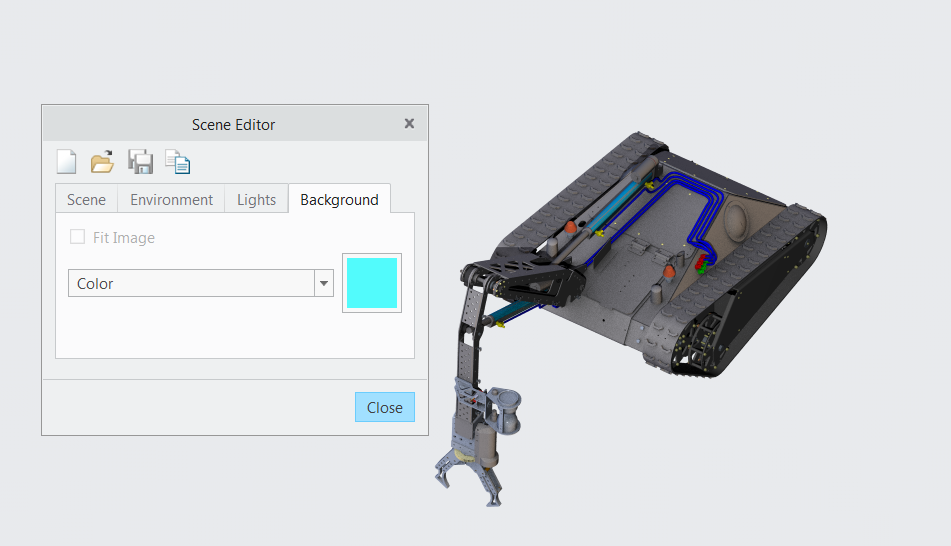
Capture2.PNG

2 replies

Aug 12, 2016 2:03 PM UTC

Does it change when you render?

Aug 17, 2016 12:10 PM UTC

Hi Oluwaseyi,

To show the background, you need to toggle the Scene Background option from the In-Graphic Toolbar.

8-17-2016 7-52-26 AM.jpg

Alternatively, you can also use the config option - 'scene_background_on' set to yes.  This will automatically check the Scene Background option.

Now since you defined the background as a color, this color will be shown in all modes - Wireframe, Hidden Line, No Hidden Shaded, Shaded with Edges and Shade with Reflections when the scene background is enabled.

However, if you keep the default scene background which is ENVIRONMENT, you will only see the scene background when the display mode is Shade with Reflections and when Perspective mode is enabled.  At that point you will see the Scene Background.

Hope this helps.

Thanks,

Mark