
Jun 22, 2016 4:19 PM UTC
Question

Incomplete (or at least different) parameter list for GTOLs?

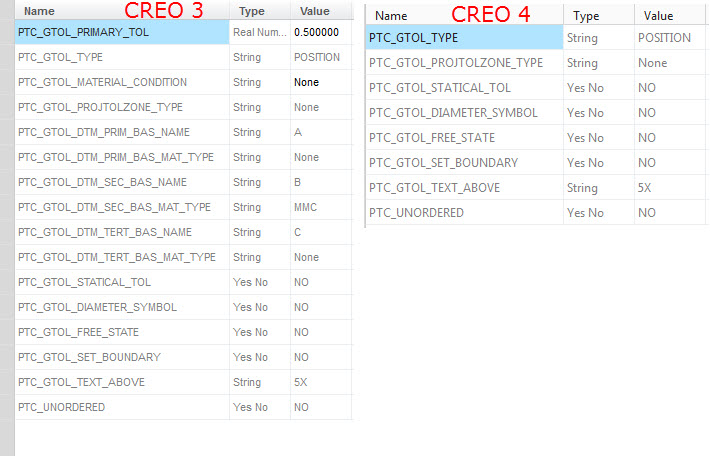
Creo 4 does not list as many parameters for GTOLs as Creo 3 (and Creo 2). See picture comparison of identical GTOL in Creo 3 and Creo 4. Is there an option to get Creo 4 to generate all the parameters?
GTOL_PARAMS.jpg

    2 replies

    Jun 24, 2016 6:25 PM UTC

    Hi Roger,

    We haven't yet updated the parameters for Creo 4.0, so this is just some unfinished work in the Beta Sneak Peek that will be fixed by the time we ship F000.

    In Creo 4.0, we will continue to support all of the parameters that were there in prior releases, but there will be some new parameters added that weren't there before. The new Creo 4.0 parameters will be providing the entire string of characters that populate the tolerance value compartment as well as the primary, secondary and tertiary datum compartments. This scheme matches the way the UI is set up where the user types in the value plus modifiers all in a single field. This is a little different from the approach used in Creo 3.0 and earlier where the UI was had a bunch of individual checkboxes for the various options, and the parameters matched this scheme by having individual parameters for the various options. In Creo 4.0, you'll be able to get the full definition of the GTOL from a smaller set of parameters that would include the full strings in the various compartments of the GTOL.

    I think it probably makes sense for me to write up another blog post that describes in more detail what's happening with parameters and why we're doing it this way as it's a little more that I'd want to put into this discussion reply.

    For now, I think the short answer to the question is that we haven't finished implementing the parameters in the Sneak Peek version, but that will be done by the time we get to F000.

    Regards,

    Raphael

    rcookAuthor
    Jun 24, 2016 9:37 PM UTC

    Thanks Raphael. Looking forward to the consolidated parameters vs. having to sort through a long list.

    -Roger