
Jul 27, 2016 7:03 AM UTC
Question

How to attach a Gtol Datum to a dimension?`

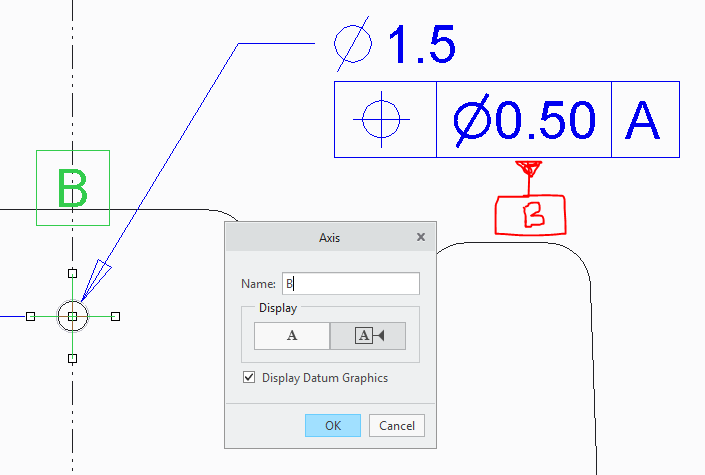
During my testing I noticed that Iam unable to find an option to attach a GTOL datum (B) to a dimension.

In earlier release of Creo, I would RMB on the datum, select Properties and in the properties dialogue box i can select placement as In Dim.

But in Creo 4 there is no option. Please let me know if there is a way to do this.
2 replies

Jul 27, 2016 7:29 PM UTC

The datum feature symbol is now just a regular annotation and not a property of a plane or axis. So, to add a datum feature symbol to a drawing you just select the icon on the ribbon and place it where you want it to go. The process no longer involves creating a plane or an axis in the model and changing its properties to be a "set" datum and then showing it in the drawing.

For more information, check out the blog post I made on the topic:

2D Detailing: Datum Feature Symbols

Also worth noting is that there is a known issue in the Sneak Peek version about placing the datum feature symbol on a GTOL if the GTOL is also placed on a dimension. We will fix that in the production version.

Jul 28, 2016 5:22 AM UTC

Thank You. I missed to read the document.