
Jun 15, 2016 3:10 PM UTC
Question

How does the master appearance state interact with material defined appearances?

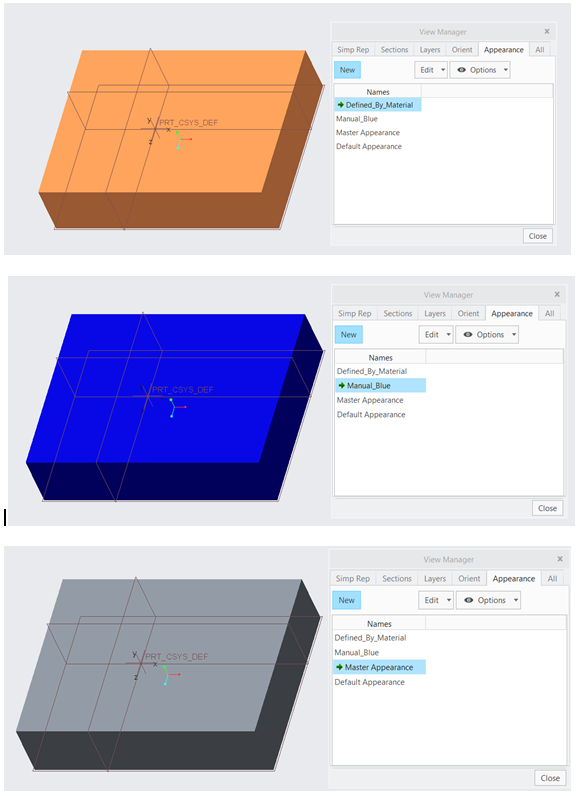
In the bottom picture I have created 2 material states.

1) I added a material and defined an appearence within the material definition

2) I added a blue color manually to the complete part

I would expect the Master Appearance to follow the appearance of the material, but it seems to have no appearance at all.

Is the Master appearance always the 'default grey' color?
Appearances.PNG

4 replies

Jun 20, 2016 6:16 PM UTC

Hi Koen,

You are correct about the Master appearance state.

Here are some more details about the two out-of-the-box appearance states (Default and Master):

  • Every model will have both a Default and a Master appearance state
    • These states cannot be renamed and they cannot be deleted
  • The Master appearance state always reflects what the model would look like with no appearances applied to it. The Master appearance state cannot be edited. If the model appearance is changed when the Master appearance is active, it will be marked with a plus ( + ) and if the user attempts to save it, a new appearance state will be created with a generic name.
    • This behavior is similar to what we do with Master simplified rep
  • The Default appearance state is the default appearance that the model will appear when opening it from disk. The Default appearance CAN be edited and saved.

So, if you open a model and change its appearance from the View tab without ever going to the View Manager and creating any appearance state, you will be modifying the Default appearance.

I hope this clears up the question.

Regards,

Raphael

Jun 21, 2016 7:17 AM UTC

Hi Raphael,

This definitely answers the question to some extent, but the interaction with appearances defined in materials feels a little bit odd to me.

Material appearances seem to be less useful, since upon assiging a material the appearance is only applied to the active appearance state.

Problem when assigning a material:

When assigning a material the view manager dialog is not open and the user should manually think about going to the view manager and saving the appearance state, which takes additional time and clicks and can easily be forgotten.

Problem when trying to find out how a certain appearance was defined:

For a user it is hard to know if an appearance in a certain state was added manually or defined by the material definition, which makes the situation unclear. Often a customer uses material appearances to identify if a material was defined and which material was defined. Now the only way to check is by re-assigning the material.

I believe it might be better to link material appearances to a specific state.

Perhaps add an additional 'Material' appearance state, which always shows the appearance of the assigned material (which exists next to master and default).

or

Add an additional 'Blank' appearance state, which always shows the model without any appearance and have the master appearance show the assigned material appearance.

Best Koen

Jun 21, 2016 4:32 PM UTC

Hi Koen,

Thanks for the reply.I think you're right that there is some room for improvement in terms of allowing the user to be able to tell more clearly where the appearance is coming from (material or manually assigned).

I'd like to invite to the conversation since he's really looking after the Appearances functionality more so than me. I'm not sure what we'll be able to do about it between now and F000 of Creo 4.0, but I think we should consider some improvements here in a future release for sure.

Regards,

Raphael