Nov 30, 2021 9:59 AM UTC
Question

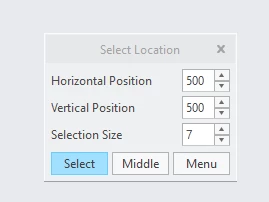
Selection location box on startup

Any ideas how to disable this please


RH_10122575_1-1638266379667.png


10 replies

Dec 1, 2021 7:26 AM UTC

What do you mean? Do you want to set the position to (0,0)?

Dec 1, 2021 8:10 AM UTC

I don't know what it is. I would prefer it not to show on launch of creo.

Dec 1, 2021 8:16 AM UTC

Hi,

rename all config.pro files to config.pro_renamed and start Creo.

Dec 1, 2021 9:13 AM UTC

how does renaming my config file fix this please.


Dec 1, 2021 9:50 AM UTC

@RH_10122575 wrote:

how does renaming my config file fix this please.


Hi,

if you use Creo Parametric then renaming config.pro will tell you whether the problem is "hidden" inside config.pro.

Dec 1, 2021 7:29 PM UTC

The last place for check are you environment vars, maybe there is a different between the default ones, open cmd shell and enter set, or the ones in Creo, open a system window and enter set as well.


Check for proTk.dat and creoTk.dat as well, because your hitachi env is not the default one 🙂