Mar 1, 2024 4:05 PM UTC
Acknowledged

Start with CreoView Lite and if needed toggle to get MCAD without exiting the tool:

Please include detailed documentation such as screenshots, images or video.

1. What product and version are you running?
Creo View 9.1.0 and CreoView 10-1-0


2. What is the problem?

End-users wants to start with CreoView Lite and when needed toggle to MCAD without the need to restart CreoView.


Consider a company with around 11500 end users

Consider 2 packages in this company: one for CreoView LITE and one for CreoView MCAD


2/3 of users applied for CreoView MCAD

1/3 of users applied for CreoView LITE

Sometimes, MCAD users just need to visualize small parts, in which case LITE would suffice.

Sometimes, LITE users need to change the color of a component, in which case they need MCAD.

Given the large number of CreoView users, CreoView MCAD is dedicated to some activities. (licenses)


Scenario 1: CreoView LITE user.

- user needs to visualize a small 3D model to verify something.

-  when geometry is loaded, he needs to highlight some items and create an annotation that is kept in Windchill

               ==> to highlight the geometry, he/she would like to change the color to gray out the entire assembly except 2 components.

               ==> But this action can be performed with CreoView MCAD only and he/she start MCAD.

               ==>The user exit CreoView and complain.


Scenario 2: CreoView MCAD user

  • User needs to visualize a small 3d models
  • As it’s a small assembly, he/she chooses CreoView Lite in the CreoView Startup box
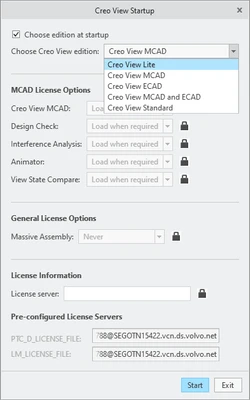
MV_2584955_0-1709307963250.png


  • He/she visualizes the 3d models, perform some measurements and close CreoView.
  • One or two days later, the same user needs to open a large assembly.
  • He/she forgets to switch to CreoView MCAD in the startup box as he often starts MCAD and starts LITE instead.
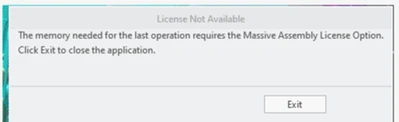
  • After some time, he/she receives this error message “the memory needed for the last operation requires the Massive Assembly License Option Click [Exit] to close the application”.MV_2584955_1-1709307985793.png
    • Sometimes he/she realized he/she forgot to choose MCAD at the startup, sometimes he/she creates an incident. And now the user will never toggle to LITE and always starts MCAD grabbing a MCAD license even if not necessary.


    Advantage to start with CreoView Lite and if needed toggle to get MCAD without exiting the tool:

    • Advantage to start with CreoView Lite and if needed get MCAD features without exiting the tool.
    • No risk for the end users to start LITE instead of MCAD.
    • A single package for all CreoView users
    • Massive assembly license could be loaded when required.


3. Are you using a workaround? If yes, please describe it.
no workaround

4. What is the use case for your organization? Describe how your idea would work in context or how it would apply to a practical situation.
please look chapter 2
5. What impact does this problem currently have on your organization? (Number of users affected, hours of lost productivity, etc.) 
More than 11500 users in the company. 


8 replies

Mar 3, 2024 5:21 PM UTC

This is an awesome idea. Also, why would Creo View MCAD option become available when you already select Creo View MCAD as the start-up?

Mar 4, 2024 8:37 AM UTC
Status changed to: Acknowledged

Hi @MV_2584955!

Thank you for your idea. Based on the information you provided, we are acknowledging it as the Community management team. This is not a commitment from the Product team. Other users may comment and vote your idea up.

Mar 4, 2024 6:40 PM UTC

Very good idea, it can help reducing licence consumption and will save time not loading again the datas.

Jul 23, 2025 4:51 PM UTC

Please include detailed documentation such as screenshots, images or video.

1. What product and version are you running?
Creo View 12


2. What is the problem?

Unable to switch between version of Creo View after launch. In the past to open large assemblies a “Massive Assembly Licenses” was required which met you need a “Standard or MCAD” license. Now in Creo View 12, this is not a requirement. Currently we have assemblies that take 20 to 25 minutes to open from Windchill “Creo View Lite” and then need additional functionality (Interference detection, etc...) and you can’t add the additional functionality to your current session.


3. Are you using a workaround? If yes, please describe it.

The only workaround that is currently available is too close Creo View, launch with different version and reopen assembly again.


4. What is the use case for your organization? Describe how your idea would work in context or how it would apply to a practical situation.

Have some kind of option like in Creo Parametric to select a float option to turn on additional functionality after opening the application.


5. What impact does this problem currently have on your organization? (Number of users affected, hours of lost productivity, etc.)

The current issue requires the end user to waste time (20-25 minutes) to reopen assemblies that are currently open to gain access to additional functionality that we have licenses for. We currently have 100 plus users at my location but hundreds more at other locations in the company.


Community Manager
Jul 24, 2025 7:09 AM UTC
Status changed to: Acknowledged

Thank you @rdemorier for your idea. Based on the information you provided, we are acknowledging it as the Community management team. This is not a commitment from the Product team. Other users may comment and vote your idea up.

Community Manager
Nov 4, 2025 10:25 AM UTC

Hello @rdemorier and @MV_2584955,


As per @DomenicLaritz's suggestion, I have merged your 2 ideas together and combined the votes as well.


Best regards,

Catalina

Nov 20, 2025 7:59 AM UTC

Now we are working with version 12.0 of Creo View