
Jun 13, 2019 2:35 PM UTC
Archived

Select all filtered Parts in Creo Illustrate
2019-06-12 09_24_36-Window.jpg

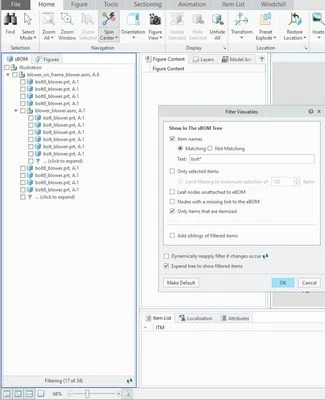
Currently in Creo Illustrate 5.1 you can apply a filter , f.e. *bolt*.

But there is no possibility to select them all at once (ctrl+a) of a list selection (shift - select top/end).
Because this selects all the "Siblings"/ other parts in sub-assemblies as well, they are just hidden by the "click to expand arrow".


Please make it so that we can easily filter and select in a logical fully functional way.


    1 reply

    olivierlp
    Community Manager
    Jul 5, 2023 3:06 PM UTC
    Status changed to: Archived

    Hello,

    We are archiving your idea as part of a general review. This action is based on the age of your idea and the total number of votes received, as per this announcement.

    You can always post a new idea with all the details required in the form.

    Thank you for your participation.

    Olivier