
Schematics Find Tool to Be Able to Search Regular Text on Drawing Sheet
Please include detailed documentation such as screenshots, images or video.
1. What product and version are you running?
Schematics 12
2. What is the problem?
The Find tool can dig deep into the parameters, but it can't simply do a flat search on a sheet like the Find tool in a Word or PDF document. In the example below, I'd like it to highlight both instances of text on the sheet without needing to know what the parameters are driving them.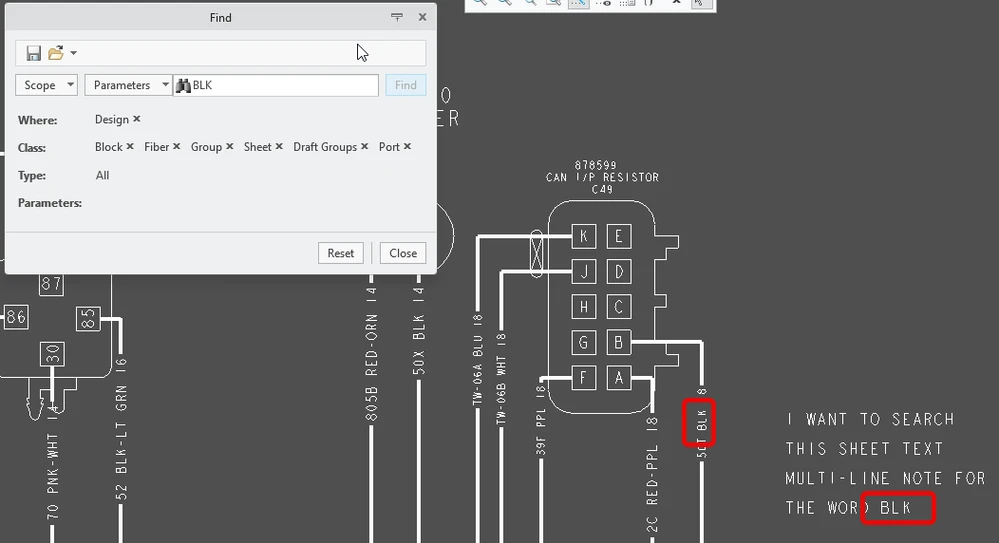
3. Are you using a workaround? If yes, please describe it.
No
4. What is the use case for your organization? Describe how your idea would work in context or how it would apply to a practical situation.
It would allow basic searching on sheets without needing to know the parameters the text could be buried in.
5. What impact does this problem currently have on your organization? (Number of users affected, hours of lost productivity, etc.)
Helps find things faster across sheets.