
Retrieve Creo Parametric native models parameters in Creo View
Please include detailed documentation such as screenshots, images or video.
1. What product and version are you running?
We are currently using Creo View 9.0 (and Creo Parametric 7.0.8.0) while connected to Windchill 11.
2. What is the problem?
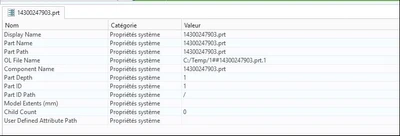
When opening a native Creo Parametric file (PRT or ASM) in Creo View, there is only few parameters of the model that are retrieved.
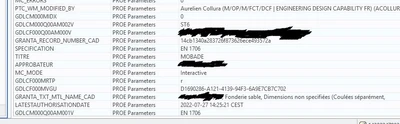
All Windchill and Creo Parametric parameters are missing meaning that we can't retrieve the material nor the surface treatment (along many other parameters) which is crucial information.
3. Are you using a workaround? If yes, please describe it.
The only workaround possible is, prior to sending the file, converting it in PVZ. But only someone with Creo Parmatric is capable to do so.
4. What is the use case for your organization? Describe how your idea would work in context or how it would apply to a practical situation.
Users open native .PRT files in Creo View and expect to have a complete model including all the parameters we find in a PRT file in Creo Parametric. Therefore, they measure the weight and density thinking that it is the correct one when it's not (one of many other examples).
View of some parameters of a model imported in PVZ in Creo View using a thumbnail from Windchill :
View of all parameters of the same model imported in PRT from a local folder in Creo View.
5. What impact does this problem currently have on your organization? (Number of users affected, hours of lost productivity, etc.)
I support around 3k Creo View users and 500 Creo Parametric users. In my organisation, Creo Parametric users are only designers. Creo View users are people who need a tool to visualize models, compare them, do some measurements but nothing more.
Parameters are a big part of the model : material, metadatas, dates, names, ... It is only normal to want to retrieve them when opening a PRT file on Creo View.