
Sep 19, 2024 7:19 AM UTC
Acknowledged

Render Mode, Page Format and Fit to Window as default

We are using Creo Illustrate 11.0.

We have to set Render Mode, Page Format and Fit to window for every new figure:
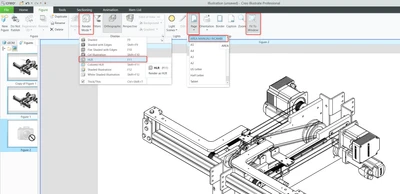
ngiacom_0-1726730127229.png

We would like to set them as default, to avoid wasting time,

No workaround
We have 5 users that create new illustrations daily, for every figure they have to set these 3 settings, everytime.

There are many options activable, these not.


I created the case C17506725 but the response was:

Please note that this is not part of Creo Illustrate functionality. 

Refer to Product Ideas @ PTC Community and consider posting a new one.


Thanks for voting

6 replies

Community Manager
Sep 19, 2024 9:35 AM UTC
Status changed to: Clarification Needed

Thank you @ngiacom for publishing your idea. However, we need more information as specified in the form you saw in the submission process. (questions below). You may simply add a comment to your idea. The more details and context you give to document your idea, the better. Think about ways to educate and convince other Community members to support your idea and present your case to the product management team for consideration.

Please let us know within the next two weeks.

1. What version of the software are you running?.
2. What is the problem?
3. Are you using a workaround? If yes, please describe it.
4. What is the use case for your organization? Describe how your idea would work in context or how it would apply to a practical situation.
5. What impact does this problem currently have on your organization? (Number of users affected, hours of lost productivity, etc.)

Additionally, I invite you to check out this topic where PTC executives explain product managers' approach to customer ideas and input for product roadmaps.


Please see below examples of well-documented ideas:

Creation of tangential dimensions following the ex... - PTC Community 

Changing all step descriptions from a sequence at ... - PTC Community 

Creo Schematics CID/WID Verification report export... - PTC Community 

ngiacomAuthor
Sep 19, 2024 9:49 AM UTC

Hi @Catalina, I replied to the questions and then I removed the questions...because in my opinion they are very redundant but if you want I can reinserte them.


1. What version of the software are you running?.

We are using Creo Illustrate 11.0.

2. What is the problem?

We have to set Render Mode, Page Format and Fit to window for every new figure:

ngiacom_0-1726739301727.png


We would like to set them as default, to avoid wasting time,


3. Are you using a workaround? If yes, please describe it.

No workaround

4. What is the use case for your organization? Describe how your idea would work in context or how it would apply to a practical situation. & 
5. What impact does this problem currently have on your organization? (Number of users affected, hours of lost productivity, etc.)

We have 5 users that create new illustrations daily, for every figure they have to set these 3 settings, everytime.

There are many options activable, these not.


Which more information do you need?

Community Manager
Sep 19, 2024 9:52 AM UTC

Hi @ngiacom,


Thanks for your question!


Please visit the links I have listed for the well-documented ideas to understand what we are looking for in the ideas that are posted.


Best regards,

Catalina 

ngiacomAuthor
Sep 19, 2024 10:11 AM UTC

Hi @Catalina,

I visited them. They replied to different questions that are questions that appared in the past. Probably someone removed the first one rightly, "Describe your role and ...") ... but if you want I can reply also to this question (copying from many other my ideas):
My company is a Manufacturing Company, I am a "Project Optimization Engineer PLM" but for you I am a Windchill Administrator and Customizer. My stakeholders are the Windchill and CAD users, many departments of the company


The other things are equal:

ngiacom_0-1726740681676.png


Then, please, if you need more information in the context of the idea, give me other questions and  I will reply, if I can.

I can't reply to business questions because I am a Plm and Cad customizer and configurator, I'm not a business man, an executive.

They don't create ideas here, I suppose. Here we have technical issues, not covered by PTC support...


Community Manager
Sep 23, 2024 8:32 AM UTC
Status changed to: Acknowledged

Thank you @ngiacom for your idea. Based on the information you provided, we are acknowledging it as the Community management team. This is not a commitment from the Product team. Other users may comment and vote your idea up.

Oct 11, 2024 2:24 PM UTC

I agree that this should be added! One potential workaround would be to create one figure with the settings you desire and duplicate that figure instead of creating a new figure each time. However, if you have already created many figures, and realize you need to change render mode, you would have to go back to each created figure and update the setting. 


I have the same issue where I would like to update the settings of all figures at once or change the default setting and apply it to all figures.