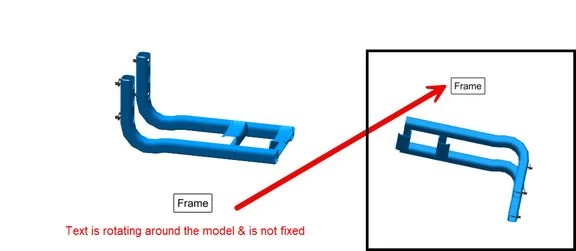
Not able to fix the 2D texts which is rotation along the 3D model in Graphic area
Please include detailed documentation such as screenshots, images or video.
1. What product and version are you running?
We are using 8.1, 9.1, 10.1 & 11.0
2. What is the problem?
Creo Illustrate users encounter challenges with notes and callouts placed within the graphic area. Not able to fix the 2D texts which is rotating along with the 3D model in Graphic area
3. Are you using a workaround? If yes, please describe it.
We don't have a workaround. We are tying to make sure the figure view is not getting affected
4. What is the use case for your organization? Describe how your idea would work in context or how it would apply to a practical situation.
We use drawing headers on (3D) figures. When notes and callouts are placed in the graphic area, they rotate around the models when the model is rotated. In Creo Illustrate 11.0, we have the option to add a caption to an inset, which remains fixed to the screen. We would like a similar option for notes and callouts in the graphic area so that they can also be fixed to the screen.
5. What impact does this problem currently have on your organization? (Number of users affected, hours of lost productivity, etc.)
Given the challenges we face with adding notes in the graphical area, we are investing in additional post-processing tools like CorelDraw to add Figure header notes.