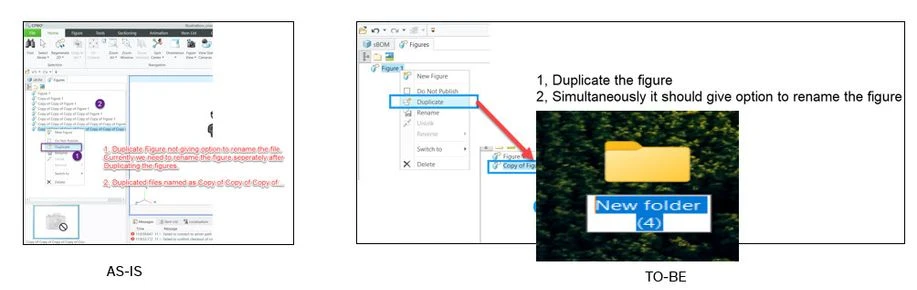
Need solution to rename the Figure while Duplicating the Figures. Also, no shortcut for rename
Please include detailed documentation such as screenshots, images or video.
1. What product and version are you running?
We are using Creo Illustrate 8.1, 9.1, 10.1 & 11.0
2. What is the problem?
Users are experiencing limitations in renaming figures during duplication processes. The current workflow requires renaming of each figures after they are duplicated, which is time-consuming and prone to errors. Additionally, the absence of a dedicated shortcut for renaming further hinders efficiency and convenience
3. Are you using a workaround? If yes, please describe it.
We don't have a workaround, but we follow these 2 step process
1, Duplicate Figure 2, Rename Figure
4. What is the use case for your organization? Describe how your idea would work in context or how it would apply to a practical situation.
We create numerous figures in Creo Illustrate and often rename them based on corresponding images. If users fail to rename figures immediately after duplicating them, it can become challenging to do so later. We suggest a solution that allows users to change the name of a new figure as soon as it's created, similar to how you rename files in Windows Explorer
5. What impact does this problem currently have on your organization? (Number of users affected, hours of lost productivity, etc.)
Renaming each duplicated figure as a second step is time-consuming, especially for large projects with numerous figures. Additionally, if users fail to rename figures immediately after duplicating them, they must revisit the image to assign a proper name, which can be a productivity issue.