
Managing multiple callouts with and without quantities within a single illustration is challenging
Please include detailed documentation such as screenshots, images or video.
1. What product and version are you running?
We are using Creo Illustrate 8.1, 9.1, 10.1 & 11.0
2. What is the problem?
Creo Illustrate users are facing challenges when working with callouts for items with a quantity of 1. The current system requires the use of two separate callouts, one with quantity and one without, leading to increased complexity and potential errors. There is no option to manually remove the quantity field from callouts, even when editable, further limiting flexibility.
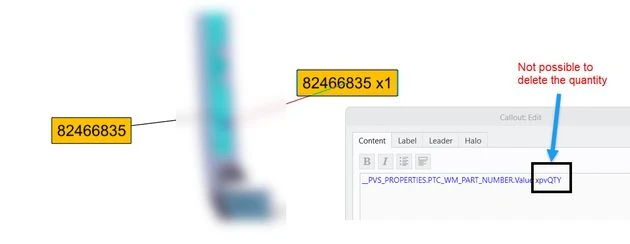
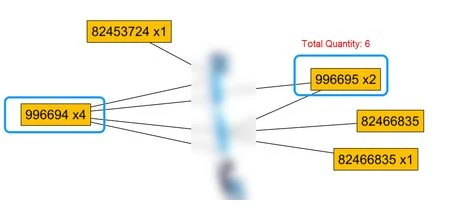
Additionally, We can’t get the total quantity of items in the callout
3. Are you using a workaround? If yes, please describe it.
we are forced to use 2 callouts with & without quantity.
4. What is the use case for your organization? Describe how your idea would work in context or how it would apply to a practical situation.
we are forced to use 2 callouts with & without quantity.
To address the limitations of quantity management in Creo Illustrate callouts, the following enhancements are proposed:
Conditional Display of Quantity Field:
- Implement a setting to conditionally display the quantity field based on the item's quantity. If the quantity is 1, the field could be hidden or displayed in a minimized format, reducing clutter and improving clarity.
Manual Removal of Quantity Field:
- Allow users to manually remove the quantity field from editable callouts, providing greater flexibility in customizing callout appearance and content.
Total Quantity Calculation:
- Introduce a feature to automatically calculate and display the total quantity of items within a callout. Reducing the need for manual calculations.
5. What impact does this problem currently have on your organization? (Number of users affected, hours of lost productivity, etc.)
We have 500+ Creo Illustrate users in our organization. Maintaining multiple callouts not only affect the productivity.
- Increased Complexity: Maintaining two separate callouts for items with and without quantities can lead to increased complexity and potential errors in the design and management of technical illustrations.
- Reduced Efficiency: The need to switch between different callouts and manually manage quantities can reduce efficiency and increase the time required to create and update technical illustrations.