
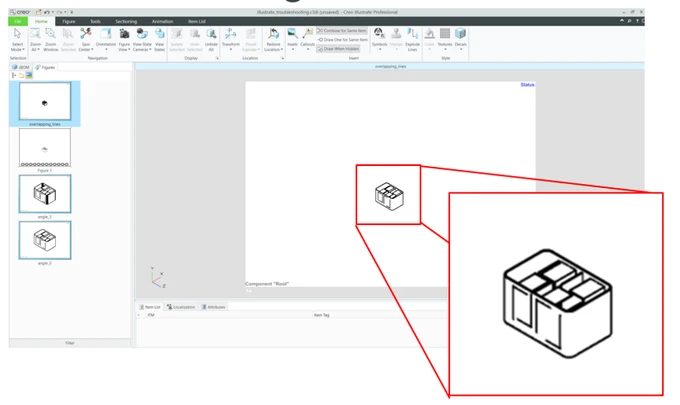
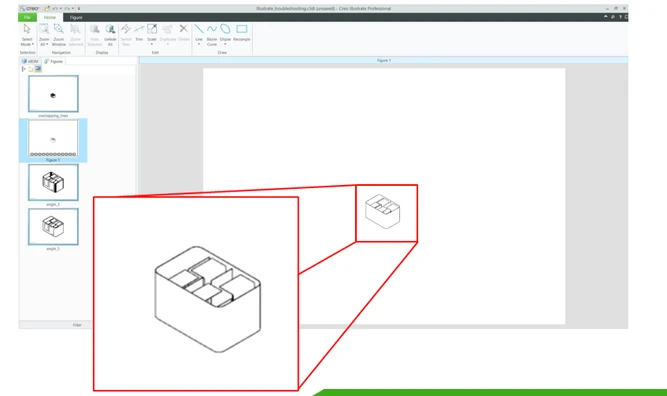
Inner components underlying thin wall components are displayed when HLR is selected in 3D figures
Please include detailed documentation such as screenshots, images or video.
1. What product and version are you running?
Creo Illustrate 9.1
2. What is the problem?
Components behind surfaces with small thickness, are overlapping and are displayed even if they should be hidden.
3D FIGURE
2D FIGURE
3. Are you using a workaround? If yes, please describe it.
No, workaround is viable. The suggested workaround in article CS147886 is not a viable solution, when dealing with big assemblies since all the 2D figures must be re-rendered.
This issue is known since 2013 and Illustrate 2013 and there is the SPR 2822552
4. What is the use case for your organization? Describe how your idea would work in context or how it would apply to a practical situation.
The internal sheetmetal components should be not visible when you look the assembly from outside. But if you zoom out enough the entire assembly, you will start seeing the edges of the internal sheetmetal components. They should not appear since they are inside.
5. What impact does this problem currently have on your organization? (Number of users affected, hours of lost productivity, etc.)
All the members of the technical illustration department (users >10 ).
Many hours of lost productivity cause this type of lines needs to be manually deleted in other graphical software (Photoshop and others).
This is time consuming and breaks the digital continuity.