
Features to create simple shapes in Creo Illustrate.
Please include detailed documentation such as screenshots, images or video.
1. What product and version are you running?
We are using Creo illustrate 8.1 to 11.0
2. What is the problem?
When creating 3D illustrations in Creo Illustrate, we encounter challenges with source models that lack critical information. As these models are often one-time use, fixing the source model is impractical. To overcome this, we resort to post-publishing tools like CorelDRAW to manually create or copy 3D shapes, leading to increased reliance on additional software and associated licensing costs.
3. Are you using a workaround? If yes, please describe it.
We are using post processing tools like CorelDraw
4. What is the use case for your organization? Describe how your idea would work in context or how it would apply to a practical situation.
When designing 3D illustrations in Creo Illustrate, users often encounter source models that are missing crucial 3D features like simple shapes (Rectangle, cylinders, spheres, etc.). As these models are typically used for a single project, modifying the source model is often not feasible. To circumvent this limitation, users currently rely on external tools like CorelDRAW to manually create or copy these basic 3D shapes, which necessitates additional software and licensing costs.
Proposed Solution:
To address this issue, we propose introducing a new feature within Creo Illustrate that allows users to directly create or copy simple 3D shapes within the software itself. This new functionality would eliminate the need for external tools and streamline the 3D illustration process.
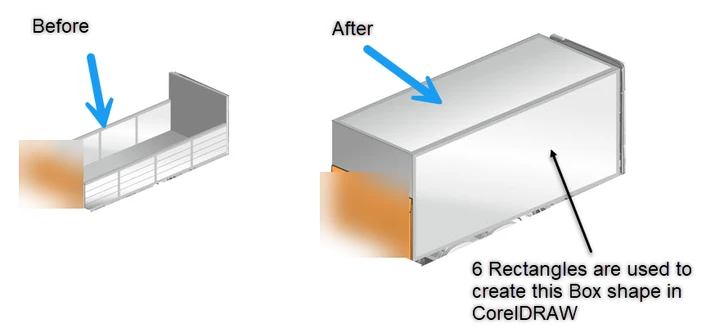
How it Would Work:
Identify Missing Feature:
User identifies a missing 3D shape within a 3D illustration.
Access New Feature:
User accesses the new "Create/Copy 3D Shape" tool, which can be found in a convenient location within the Creo Illustrate interface.
Select Shape Type:
User selects the desired 3D shape type from a predefined list (e.g., cube, cylinder, sphere, cone, pyramid).
Define Shape Properties:
User defines the shape's dimensions, position, orientation, and material properties using intuitive controls.
Create or Copy Shape:
User chooses to either create a new shape or copy an existing shape, modifying its properties as needed.
Integrate into Illustration:
The newly created or modified shape is seamlessly integrated into the 3D illustration, ready for further editing and rendering.
Benefits:
Increased Efficiency: By eliminating the need for external tools, users can save time and effort in creating or copying simple 3D shapes.
Reduced Costs: Lower software licensing costs by reducing reliance on additional tools.
Improved Workflow: A more streamlined and intuitive workflow within Creo Illustrate.
Enhanced Flexibility: Greater control over the creation and modification of 3D shapes within the software.
5. What impact does this problem currently have on your organization? (Number of users affected, hours of lost productivity, etc.)
Around 500+ users are affected. Creo Illustrate is having limited post processing functionality, which is forcing us to invest on other tools like Corel Draw / Adobe Illustrator,