
Excessive storage space consumption by 3D/2D Figures in Creo Illustrate
Please include detailed documentation such as screenshots, images or video.
1. What product and version are you running?
We are using Creo Illustrate 8.1, 9.1, 10.1 & 11.0
2. What is the problem?
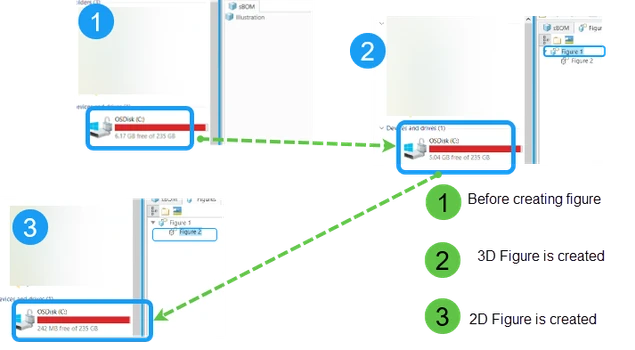
Excessive Storage Consumption: Creo Illustrate does not effectively manage the storage space required for 3D/2D figure when dealing with large PVZ files. This results in a significant consumption of C-drive space, which is negatively impacting the overall efficiency and performance
3. Are you using a workaround? If yes, please describe it.
No workaround available
4. What is the use case for your organization? Describe how your idea would work in context or how it would apply to a practical situation.
Use Case: As a manufacturing company we use Creo Illustrate to create technical illustrations for our products. Creating 3D & 2D Figures in Creo Illustrate with large PVZ files consumes a substantial amount of C-drive space, leading to storage limitations and performance issues.
Solution:
Optimize PVZ File Size: Implement strategies to reduce the size of PVZ files
- Implement Storage Management : Effective storage management practices to optimize the use of available storage space
5. What impact does this problem currently have on your organization? (Number of users affected, hours of lost productivity, etc.)
Inefficient Resource Allocation: The excessive storage consumption by Creo Illustrate, particularly when importing large PVZ files, can lead to inefficient resource allocation. This results in:
- Storage limitations
- Performance issues
- Data management challenges