
Aug 5, 2021 2:31 PM UTC
Archived

Enable improved collaboration in Creo View

When multiple people are reviewing a file in Creo View, there is the capability to pull up any existing markup annotations. However, you have to switch around to see the different views, or pull them up side by side.

It would be nice to show annotation sets like layers on the view so you can see every else's comments as you enter your own. Optionally turned on of course as everyone uses annotation sets differently.


Real time collaboration would be great and next level, but next best thing would be showing all the saved annotations in the same space.


Mock-up of how the idea could work:
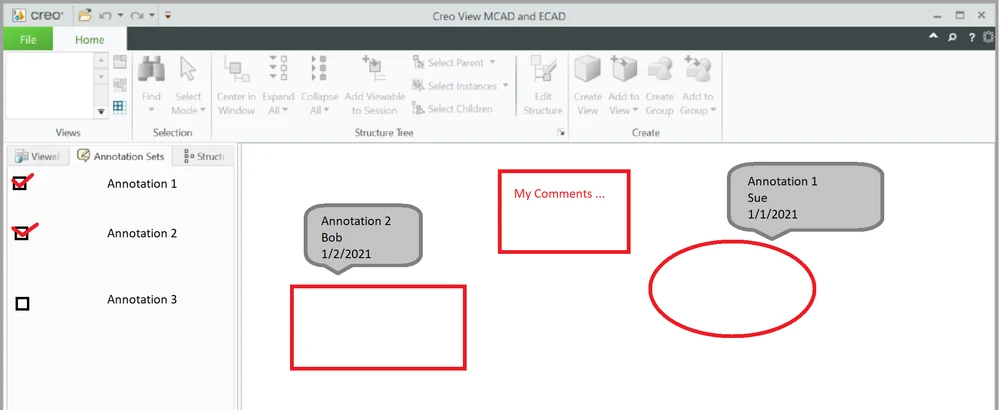
 

demo_layered_annotations.png


6 replies

Nov 10, 2021 11:51 PM UTC

I'd be happy if Creo View notified me when a user created / updated an annotation while I'm working in the same drawing/assembly/part.  It would be nice if the annotation tab had an additional view in addition to folder and thumbnail view where the view only showed my annotations along with annotations created the last week from other users.  The modifier name and date metadata shown in your picture is nice and would allow for a filter to be created.  We have a few assemblies where the number of annotations from multiple users exceeds 1000 so the solution of collaborating simultaneously would be valuable...need to be able to update the session to see the new annotations from the windchill table without exiting the session.  

slaphaAuthor
May 3, 2023 8:06 PM UTC

I've been doing some digging because our department is really trying to find a better model collaboration solution natively to combat having to go with any third party solutions.

PTC has existing capabilities that are SO close to being able to provide this function.


  1. Creo View has the Design Check capability. This provides a great way to accept/reject/comment on items, even has a way to respond to comments.
    • However it is specific to an annotation set. You cannot see these directly from the model without activating the annotation set.
    • You also cannot activate more than 1 annotation set at a time to view comments from multiple individuals working in parallel.
  2. You can apply the annotation sets to another annotation set to combine the annotations
    • These sort of layer on top and it does perform some hiding which can be un-hidden.
    • This creates a new annotation set of data and does not appear to be linked to the original annotations
    • Though this does show the ability to layer the data together
    • You cannot select all annotation sets and apply to a new view, you have to do them individually
  3. Applying the annotation sets does carry over Design Check capabilities and maintains a review history
    • Though again, likely not tied to the original data, more like copying over a file where things are the same, just with some historical tracking.
  4. The PVZ exported file contains each annotation set as a separate AST file.
    • Even more proof they should be able to be layered somehow.

It feels like all the pieces are there, the software just has to be programmed to show multiple annotation sets together in a single view.

May 4, 2023 4:40 PM UTC

slapha We have been asking for those capabilities for years. I will add them to my TC OneNote so I remember to discuss these issues.

Oct 11, 2024 6:38 PM UTC

This would be good!


Also, reference a similar Community thread topic which needs to be considered/integrated with this idea:

Creo View Mark Ups displayed in all the combinatio... - PTC Community

This was going to get rewritten as a Idea submission, but I couldn't find one in the Ideas.


Also reference PTC Support post and answer:  Article - CS374272 - Is it possible to make markups as part of combined states in Creo View (ptc.com)

Community Manager
Dec 19, 2024 11:20 AM UTC
Status changed to: Acknowledged

Hello,

Thank you for your idea. Based on the details and popularity of your idea, we are acknowledging it as the Community management team. This is not a commitment from the Product team.

olivierlp
Community Manager
Oct 8, 2025 3:11 PM UTC
Status changed to: Archived

Hello,

We are archiving your idea as part of a general review. This action is based on the age of your idea and the total number of votes received, as per this announcement.

You can always post a new idea with all the details required in the form.

Thank you for your participation.

Olivier