
Display Pipeline Reports (e.g. Bend Tables) in Creo View
Please include detailed documentation such as screenshots, images or video.
1. What product and version are you running?
Creo Parametric 7.0.9.0
Creo View 8.1.0.0
2. What is the problem?
Pipeline reports (e.g. bend tables) can only be accessed from within Creo Parametric. Existing support article CS378897 suggestion to manually input bend table information in comments is unsatisfactory for handling this type of information in Creo MBD.
Creo MBD releases are handled via PVZ exports opened in Creo View, so this type of data should be preserved and viewable from the released PVZ.
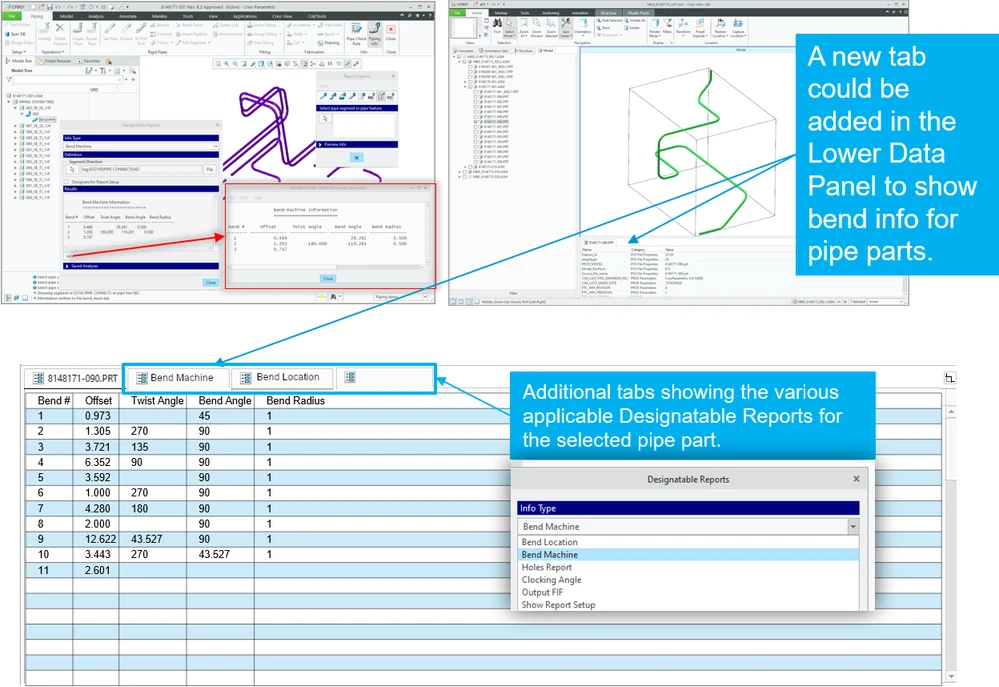
Ideally, the various reports would be published within the PVZ and accessible in a convenient location when selected a pipe model. The Lower Data Panel seems like an ideal location for just such metadata, where additional tabs could be implemented. A mockup of this idea is shown below:
3. Are you using a workaround? If yes, please describe it.
The workaround as it stands is to manually input bend table information into callouts, or simply give up trying to use MBD for piping assemblies and revert to 2D drawings with tables.
4. What is the use case for your organization? Describe how your idea would work in context or how it would apply to a practical situation.
This would not only allow MBD to be used for piping assemblies, but also reduce the burden of creating additional bend tables when the metadata is already present and accessible.