
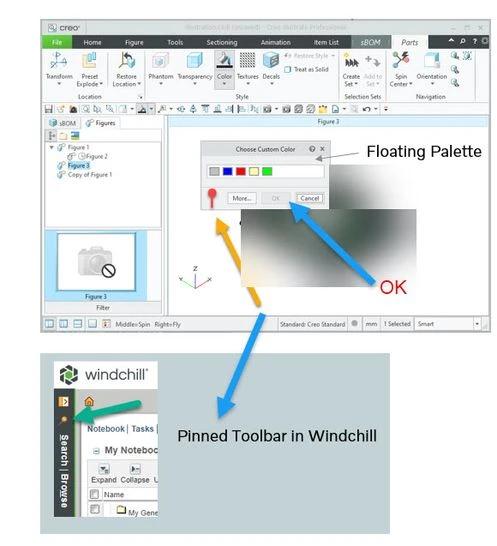
Custom color palette to stay visible until the user chooses to close it,
Please include detailed documentation such as screenshots, images or video.
1. What product and version are you running?
We are using Creo Illustrate 8.1, 9.1, 10.1 & 11.0
2. What is the problem?
Creo Illustrate users are encountering a usability issue with the custom color palette. The palette currently disappears as soon as the user clicks "OK," requiring them to reopen it if they need to access colors again. This transient behavior can lead to inefficiencies, especially for users who need to apply custom colors for multiple parts during the design process.
3. Are you using a workaround? If yes, please describe it.
No workaround available
4. What is the use case for your organization? Describe how your idea would work in context or how it would apply to a practical situation.
To assign colors to multiple parts within an assembly, such as 10 parts, the color palette must be opened 10 times.
To address this issue, Creo Illustrate could implement a persistent custom color palette that remains visible until the user explicitly chooses to close it. This would provide users with a more convenient and efficient way to access and manage their custom colors.
Persistent Palette Option: Add a checkbox or toggle button to the color palette settings that allows users to choose whether they want the palette to remain visible or disappear after clicking "OK."
5. What impact does this problem currently have on your organization? (Number of users affected, hours of lost productivity, etc.)
500+ users are impacted as below
- Increased Design Time: Users may need to repeatedly open and close the color palette, adding extra steps to their workflow.
- Frustration and User Discomfort: The disappearing palette can be frustrating for users, leading to potential user discomfort and decreased satisfaction with the software.
- Potential for Errors: Frequent palette opening and closing can increase the risk of accidental color changes or selections, leading to potential errors in the design.