
Creo View - View State Compare to report changes in Family Table instances
1. Describe your environment: What is your industry? What is your role in your organization? Describe your stakeholders. I am a CAD checker for a large aerospace and defense company.
2. What product and version are you currently running? Creo View 9.0
3. Describe the problem you are trying to solve. Please include detailed documentation such as screenshots, images or video.
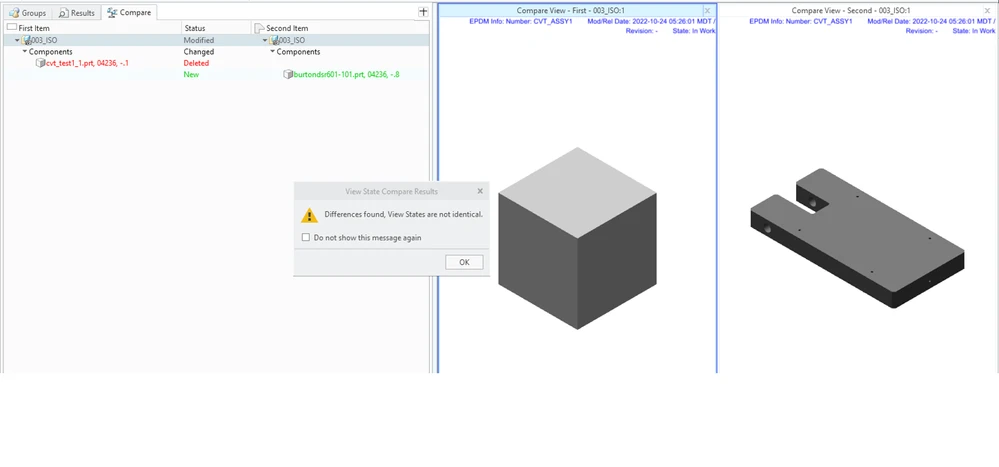
When using the View State Compare tool with an assembly file, the structure of the assembly is compared and any changes cause Vies State Compare to report that there are changes. However only when a model has been replaced with a non-associated CAD model does it get reported in the results window as models being deleted/added. Changes between instances of a family table are recognized by the tool, but not reported in the results window.
Results when comparing with non-associated model changes:
Results when comparing with Family Table instance change:
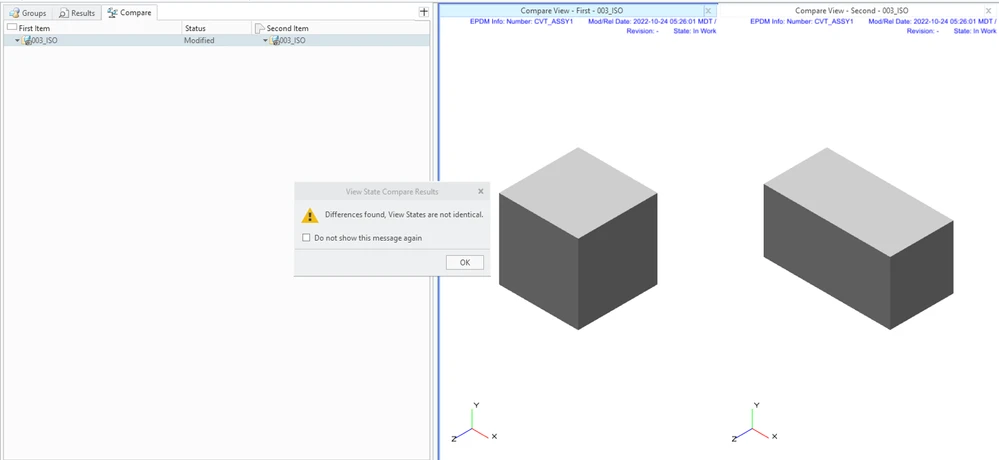
While the geometry compare tool can be used to compare structure, getting incomplete results from View State Compare is less than desirable. It can lead to confusion, missed changes, errors and ultimately additional cost to the program. View State Compare should be updated to report Family Table instances the same way as unrelated models.
4. What is the use case for your organization? Verification of changes to MBD based assemblies.
5. What business value would your suggestion represent for your organization? As stated above, having incomplete data can and will lead to misses when comparing more complex assemblies/changes which will lead to additional revisions and cost to the programs.