
Dec 4, 2024 6:50 AM UTC
Acknowledged

Creo View - measure in sets

Please include detailed documentation such as screenshots, images or video.

1. What product and version are you running?

Creo View 10.1


2. What is the problem?
Unable to show more than 1 dimension during measuring. We need to measure for example all outer dimensions and show them at the same time.

3. Are you using a workaround? If yes, please describe it.
Have to use "Apply the measurements to the view" after each measuring.

4. What is the use case for your organization? Describe how your idea would work in context or how it would apply to a practical situation.
I suggest to add new funcion allowing measuring in sets so more than 1 dimension at the time may be showed:
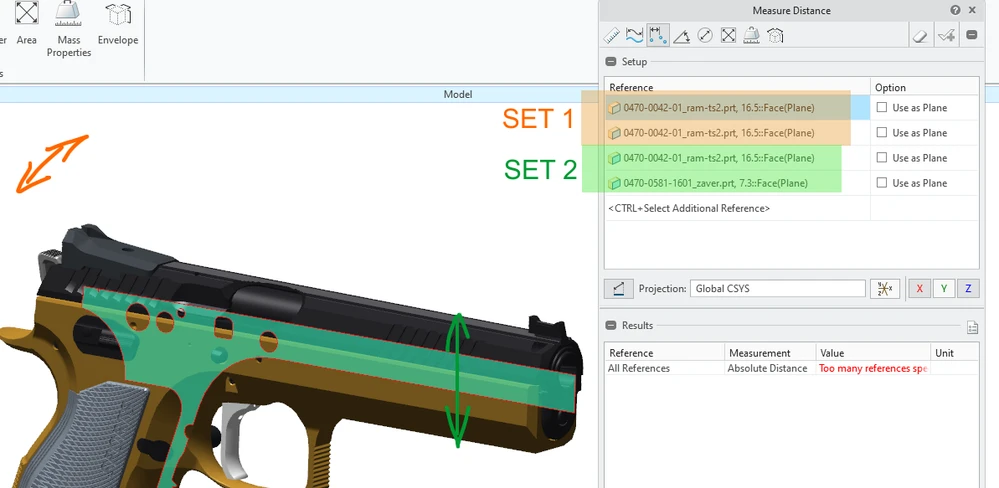
 

CV-sets.png


5. What impact does this problem currently have on your organization? (Number of users affected, hours of lost productivity, etc.)
Forcing users to create more outputs when need to show more dimensions = waste of time.

3 replies

Community Manager
Dec 4, 2024 3:35 PM UTC
Status changed to: Clarification Needed

Thank you @PetrP for publishing your idea. However, we need more information as specified in the form you saw in the submission process. You may simply add a comment to your idea. The more details and context you give to document your idea, the better. Think about ways to educate and convince other Community members to support your idea and present your case to the product management team for consideration.

Please let us know within the next two weeks.

Additionally, I invite you to check out this topic where PTC executives explain product managers' approach to customer ideas and input for product roadmaps.

Please see examples of well-documented ideas:

https://community.ptc.com/t5/Creo-View-Illustrate-Schematics/Inability-of-Creo-Illustrate-to-produce-3D-figures-with-color/idi-p/977424  

https://community.ptc.com/t5/Creo-View-Illustrate-Schematics/Adding-light-and-Changing-its-position-isn-t-very-user-friendly/idi-p/977434  

https://community.ptc.com/t5/Creo-View-Illustrate-Schematics/Enhancements-for-Insets-in-Creo-Illustrate-Beyond-Magnification/idi-p/977438  

https://community.ptc.com/t5/Creo-View-Illustrate-Schematics/Explode-STEP-files-amp-other-converted-models-in-Creo-Illustrate/idi-p/977468  

https://community.ptc.com/t5/Creo-View-Illustrate-Schematics/2D-scalable-vector-symbols-with-Halos/idi-p/977477  

PetrPAuthor
Dec 5, 2024 6:22 AM UTC

Current state to get 3 dimesions:

Create measurement no. 1

Apply the measurements to the view

Create measurement no. 2

Apply the measurements to the view

Create measurement no. 3

Apply the measurements to the view

My suggestion:

Create one measurement by 3 sets

Apply the measurements to the view

Community Manager
Dec 5, 2024 10:45 AM UTC
Status changed to: Acknowledged

Thank you @PetrP for your idea. Based on the information you provided, we are acknowledging it as the Community management team. This is not a commitment from the Product team. Other users may comment and vote your idea up.