
Creo View MCAD to 'Compare' Models that include Bodies
1. Describe your environment: What is your industry? What is your role in your organization? Describe your stakeholders.
We design and manufacture high-end electronics. I am the CAD Manager / PTC SME. Stakeholders for this idea include our Creo Parametric, Windchill and Creo View user community; a big part of our organization.
2. What product and version are you currently running?
Creo View 9.1 with Creo Parametric 8.0.6.0
3. Describe the problem you are trying to solve. Please include detailed documentation such as screenshots, images or video.
Refer to case 16669999
For those who are unaware, there is additional functionality, on top of Creo View Lite, that requires extra licenses. One of this functionality we feel bring a lot of value is the 'COMPARE' tool within the Creo View MCAD license. It allows for an easy way to view changes between drawings, parts and assemblies.
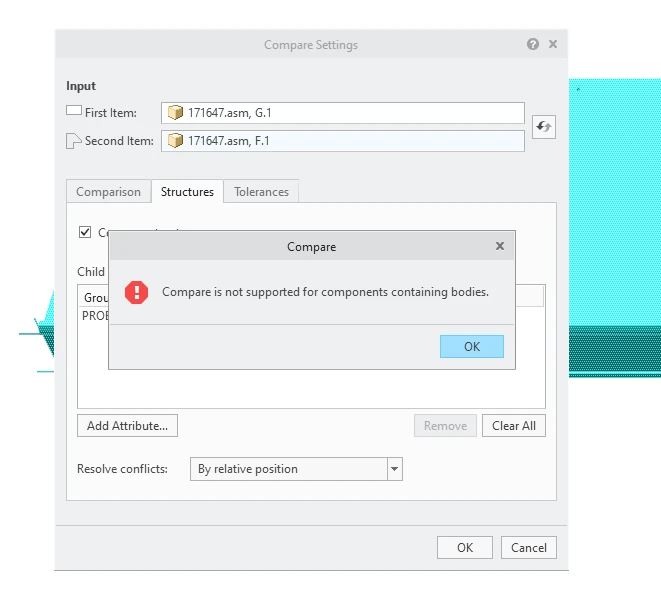
However, it has come to our attention that Creo View 9.1 (and under) can't compare models that include bodies from Creo Parametric 7. This caught us off guard, since Creo View should support new functionality with Creo Parametric. Creo View 7 should support Creo Parametric 7, Creo View 8 should support Creo Parametric 8... and so on. Here, we have Creo View 9.1 (just released) still not supporting functionality with Creo Parametric 7!
It gets even worse. If we have 2 versions of a product, and we would like to see what changed, the comparison won't work as long as 1 part, inside the product, has more than one body. This can be even a resistor! Furthermore, it still won't work if you don't ask for any geometry or mass data analysis. All we want to know is what got added, removed or moved. We don't care about bodies!
We now have two options moving forward:
1 - Not to renew these licenses and explain to leadership and our sales rep why this amazing tool no longer works with 3 year old files
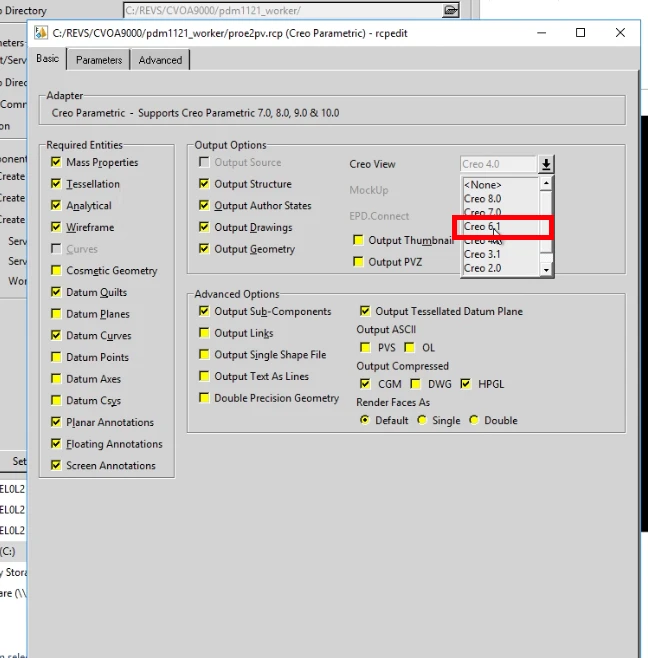
2 - Go to the PLM team and convince them to change their recipe settings to publish for Creo View 6.1! Then, they need to republish ALL visualizations from the last 3 years!
I'm not liking any of those 2 options. If PTC product management could commit to a Creo View 10 release, then we could most likely hold out; since most 'Comparisons' happen at the part or drawing level; not necessarily at the product level.
4. What is the use case for your organization?
We have use-cases where bodies are being used (although rarely) and now we loose the main functionality within Creo View MCAD that we bought it for. We can't go back as we have data (especially library data) already within Windchill that includes bodies.
5. What business value would your suggestion represent for your organization?
I consider this a 'regression'. Therefore, if this doesn't get 'fixed', we would loose business value as we can no longer compare cad data from Windchill using Creo View. It would definitely cause concern during our renewal period whether these licenses should be renewed if Creo View can't even work with 3 year old Creo files.