
Feb 28, 2023 5:19 PM UTC
Delivered

Creo View - Increase or Remove 4GB Memory Limit

1. Describe your environment: What is your industry? What is your role in your organization? Describe your stakeholders.
Machine Automation. Creo and Windchill admin. Creo View Users.


2. What product and version are you currently running?
Creo View 8.0.0.0

3. Describe the problem you are trying to solve. Please include detailed documentation such as screenshots, images or video.
User's occasionally run across this error message when working on larger Creo View assemblies or having too many models open. This message is frustrating because it force closes Creo View and prematurely ends whatever work the user may have been working on. https://www.ptc.com/en/support/article/CS47101
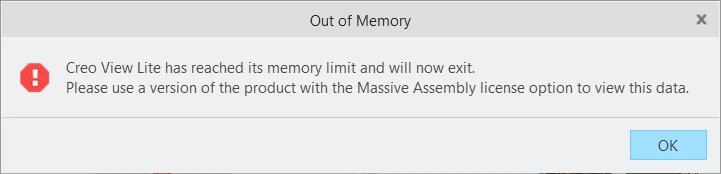
 

Creo View 4GB Memory Limit.png


We can train users to get around this arbitrary 4GB limit by telling them close unused models, open subassemblies instead of top level models, use Render Mode = Shaded instead of Shaded with Edges, etc. This 4GB limit has been around since Creo View 2 (March 2012 - roughly 11 years).


Upon investigating the Creo View MCAD Massive Assembly Option, I was floored by the awful pricing. It requires Creo View MCAD ~$3.1K floating list lease price plus either ~$5.5K registered user or ~$15.5K concurrent user for the Massive Assembly Option. This is significantly more than the cost of using Creo Parametric - all to increase RAM beyond 4GB. Pretty much impossible to justify buying.


Ideas:

  • Increase the 4GB limit to 8GB for Creo View Lite/MCAD or get rid of this arbitrary limit.
  • Creo View MCAD should include the 16GB Massive Assembly Option.
  • Give the user a better experience if the arbitrary limit stays around. Force closing on users is a terrible user experience. Give an option to undo last action that caused them to exceed the limit.
  • Provide a better error message that includes the GB limit and common ways to reduces memory usage, etc.


4. What is the use case for your organization?
Easier to work with larger assemblies and take advantage of more powerful new computer hardware.

5. What business value would your suggestion represent for your organization?
Better user experience, better value for Creo View users, and less confusing licensing.

7 replies

Mar 1, 2023 7:37 AM UTC
Status changed to: Acknowledged

Hi @lhoogeveen!

Thank you for your idea. Based on the information you provided, we are acknowledging it as the Community management team. This is not a commitment from the Product team. Other users may comment and vote your idea up.

May 17, 2023 1:08 PM UTC

Hi @lhoogeveen 
Thanks for raising this!
I was about to raise this idea as new, and I found yours already posted here.


I am new to the PTC Community pages; however, I am working on PTC products from last many years. I am an admin for Creo View and I have a few thousands of users to support. I regularly help them with Creo View issues.
Most of my Creo View MCAD users work with relatively large assemblies (in terms of complexities and number of components). Often, when they are modifying the Creo View CAD Data (let's say, add some annotation, dimensions, or just turn on 'shaded with edges' view)... the pop-up error 'Out of Memory' appears, and they have to force close the Creo View session. Hence, all of the modifications, time and effort are lost... The User has to work again with no surety if it pops-up again. ...Making the whole process quite inefficient...


I am in support of all of your shared Ideas to improve on this frustrating "force close" behavior.  Especially, your third idea seems an essential feature: "Give the user a better experience if the arbitrary limit stays around. Force closing on users is a terrible user experience. Give an option to undo last action that caused them to exceed the limit."
Another way to mitigate this issue could be to provide an option to 'Save' before force closing the Creo View session, Hence, at least the work done so far isn't lost.


I wish this topic gets up voted. 🙂 

Jun 9, 2023 7:46 AM UTC

We have the same thing.

Now also at PTC sales to discuss but they keep coming up with a strange explanation.

We are a large company and are at the point of whether to go for PTC or not. But PTC Creo does not have a free viewer for larger models.
They will notice if we buy +500 licenses elsewhere and cancel all existing PTC licenses of all their products.


Tip for PTC, look @ Navisworks 😉

Jun 14, 2024 7:53 PM UTC

@achirila or @olivierlp You can marked this as delivered as it looks like the 4GB limit was increased to 16GB in Creo View 11.0.0.0. Thanks PTC for listening!

https://support.ptc.com/help/creo/view/r11.0/en/index.html#page/creo_view/whats_new/11/Increase_Memory_Limit_for_Creo_View_Lite_and_Express_From_4Gb_to_16Gb.html#

Jan 9, 2025 3:06 PM UTC

Bumping @lhoogeveen's comment.


@achirila or @olivierlp You can marked this as delivered as it looks like the 4GB limit was increased to 16GB in Creo View 11.0.0.0. Thanks PTC for listening!"

Community Manager
Jan 9, 2025 3:42 PM UTC
Status changed to: Delivered
Feb 12, 2025 1:02 PM UTC

Thanks PTC!