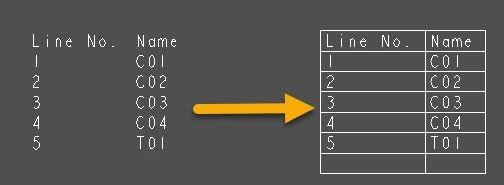
Creo Schematics - report tables on drawing should show lines by default
Please include detailed documentation such as screenshots, images or video.
1. What product and version are you running?
creo schematics 10
2. What is the problem?
when dropping a report table on the drawing, the lines between cells are not there by default
3. Are you using a workaround? If yes, please describe it.
very clumsy workaround for setting those lines up. not intuitive at all
4. What is the use case for your organization? Describe how your idea would work in context or how it would apply to a practical situation.
a newer user might take about 15-20 min trying to figure this out. it's rather clumsy
5. What impact does this problem currently have on your organization? (Number of users affected, hours of lost productivity, etc.)
Not much, but newer users will expect these tables to have the lines