
May 14, 2024 6:55 PM UTC
Under Consideration

Creo schematics function to highlight wires sitting on top/overlapping one another.

Please include detailed documentation such as screenshots, images or video.

1. What product and version are you running?
creo schematics 10


2. What is the problem?
when cleaning up  a large schematic  sometimes wires sit on top of one another.  it takes time for a trained eye to see those "T junctions".

  I am asking for an enhancement/function that can either find and put circles on those overlaps so we can fix them or highlight the the combined segment that is overlapping.
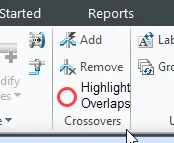
PetePickettII_3-1715712823244.png


this image is using circles to highlight those junctions.
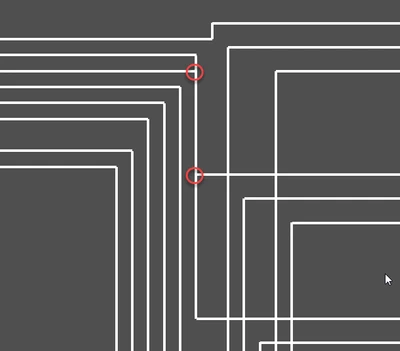
PetePickettII_1-1715712465446.png

or possibly highlight the overlap segment (or both)
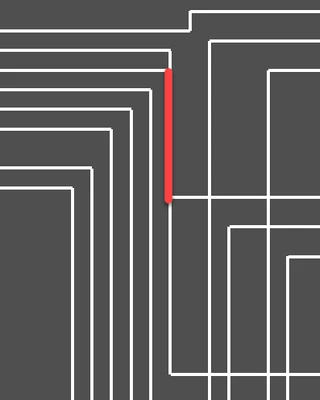
PetePickettII_2-1715712560583.png


3. Are you using a workaround? If yes, please describe it.
yes, we have to spend 20-30 min on a large harness making sure we dont have those overlapping segments

4. What is the use case for your organization? Describe how your idea would work in context or how it would apply to a practical situation.
it helps another person trace  the schematic when it has been printed or exports

5. What impact does this problem currently have on your organization? (Number of users affected, hours of lost productivity, etc.)
10-30 min a design depending on how complex the design is.

7 replies

olivierlp
Community Manager
May 14, 2024 8:58 PM UTC
Status changed to: Acknowledged

Thank you @PetePickettII for your idea. Based on the information you provided, we are acknowledging it as the Community management team. This is not a commitment from the Product team. Other users may comment and vote your idea up.

Olivier
May 14, 2024 8:58 PM UTC

I would like to add to the problem statement.  Anytime we drawing fibers from one entity to another, we have to make a choice.  Do I spread the entities out so that my fibers are straight, or do I add bends to the fibers.  In the attached image, I kept to mating connectors "tight" for readability consideration and chose to add bends in the fibers.  But as Pete described, time is then spent to clean up and align all the fibers to keep them from crossing.  A tool that would highlight any overlapping fibers is a great idea, but why not shoot for the stars?  Why couldn't there be an "Auto-Fan" button to figure out the spacing between point A and B and do the job for us?  If we can't have that, then yes, highlight them so I can find the fibers faster to get the sheet cleaned up.

Frank_M_0-1715719843687.png


May 14, 2024 11:18 PM UTC

Great addition Frank.  I think at some point when they add A.I. to the software they could give us a great utility to try out and optimize our layout and even move connectors to shrink the whole schematic!  I mean.. shoot for the stars right!

Jul 3, 2024 12:48 PM UTC
Status changed to: Clarification Needed

Pete,

Thanks for the idea.

Based on your description, it looks like a display mode you can toggle on or off.
If so, what is your expectation for export? 

Do you need this visible in PDF or EDA?

Jul 3, 2024 12:56 PM UTC

No need for export,  this will be a visual tool only to help us clean schematics up.   I figured it would be easier than implementing something to automatically do this.  Sometimes i look at the overlapped wires and consider moving the connector block instead if it's wired fibers can be shortened.


i would also guess that some people do not use a grid so i suppose it would need to use the tolerances shown here

PetePickettII_0-1720011390398.png


Nov 5, 2025 4:20 PM UTC

found my white paper from 2006!  

Proposed functionality for

Routed System Designer

FIBER CLEANUP Button

Pete Pickett – Mercury MerCruiser

20-July-06


When routing many fibers in a large schematic, I would like to see a button that moves wires around to avoid sitting on top of another wire.  This tool would search 2 fibers that share the same lengths for more then 1mm.  This would allow the utility to not worry about crossing wires, but instead, modifying existing fibers that lay on top of one another. It can take the shorter fiber and offset it by a set amount or by one grid spacing, verifying that it didn’t place it on top of another fiber.


Change this ..

PetePickettII_0-1762359578268.png


To look like this..

PetePickettII_1-1762359578269.png


Nov 12, 2025 1:41 PM UTC
Status changed to: Under Consideration