
Nov 12, 2024 6:08 AM UTC
Acknowledged

Creo Illustrate - Options to manually type edit Renumber/Resequencing of callouts

Please include detailed documentation such as screenshots, images or video.

1. What product and version are you running?

Creo Illustrate 10.0.0.0


2. What is the problem?

Options to manually type edit renumber/resequence of callouts from Renumbering/Resequencing options selection box (Sequence Number :).
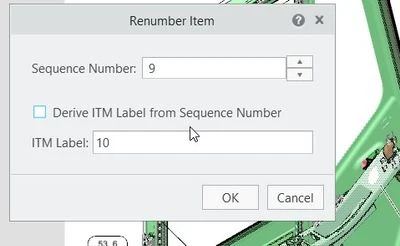
PTCCom.jpg

Current behavior is to select the callouts by clicking on the up/down arrows for every increase in number. So, when we have to renumber from 10 to 75, the arrow has to be clicked 65 times to get to that callout.

3. Are you using a workaround? If yes, please describe it.

We are using the existing functionality.

4. What is the use case for your organization? Describe how your idea would work in context or how it would apply to a practical situation.

When the callouts have to be renumbered, the Illustrators has to iterate from the existing callout value to the new value through the up/down button in Sequence Number Text Box selection box.


For ex. when we have to renumber from 10 to 75, the arrow has to be clicked 65 times to get to that callout.

This is a huge time-consuming work, where Illustrator has to click as many times as the callout difference are.

5. What impact does this problem currently have on your organization? (Number of users affected, hours of lost productivity, etc.)
User affected: 70+ (All Production users)

Approx: 140 hours per month.

3 replies

Community Manager
Nov 12, 2024 10:09 AM UTC
Status changed to: Acknowledged

Thank you @SAK@ARUN for your idea. Based on the information you provided, we are acknowledging it as the Community management team. This is not a commitment from the Product team. Other users may comment and vote your idea up.

Nov 12, 2024 10:22 AM UTC

Could you add some more background information, are you renumbering the whole figure or just individual items?

How does a renumber like this affect the item list, ie; are all the items being renumbered?

Why are you renumbering an item in such a way? 

We would really need to understand the usecase for such a renumbering so we can be sure that any enhancements we make will resolve your issue.


SAK@ARUNAuthor
Nov 12, 2024 10:30 AM UTC

@agarland 

Could you add some more background information, are you renumbering the whole figure or just individual items?

 -  We will re-sequence number for individual items. For ex. If I need to resequence from 10 to 75, we have to keep increasing the sequence number arrow for 65 times to get to that value. 


How does a renumber like this affect the item list, ie; are all the items being renumbered?

Re-sequence is needed when we are combining the callouts for parts. 


Why are you renumbering an item in such a way? 

When combining the callouts, and to bring the callouts in order based on the request, re-sequence is used.