
Creo Illustrate needs better callout placement tools
Please include detailed documentation such as screenshots, images or video.
1. What product and version are you running?
We are using Creo Illustrate 8.1, 9.1, 10.1 & 11.0
2. What is the problem?
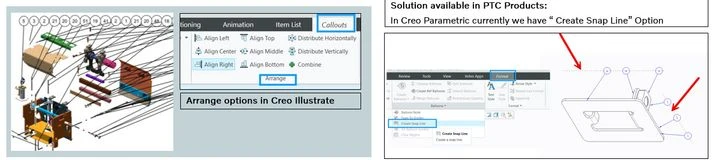
Creo Illustrate currently lacks options to arrange callouts at specific angles and does not provide snap lines for precise placement.
3. Are you using a workaround? If yes, please describe it.
Currently we are manually arranging the callouts in specific angle.
4. What is the use case for your organization? Describe how your idea would work in context or how it would apply to a practical situation.
Creo Illustrate users are facing challenges with the current callout arrangement options. The lack of precise placement tools, such as specific angle options and snap lines, hinders the ability to create accurate, visually appealing, and consistent technical illustrations. Adding snap line / Magnetic line to achieve precise callout placement. In Creo Parametric, we have Snap line option for callouts arrangements.
5. What impact does this problem currently have on your organization? (Number of users affected, hours of lost productivity, etc.)
Some of the negative impacts we are facing are
- Increased design time: Manually arranging callouts can be time-consuming, especially for complex illustrations with numerous callouts.
- Reduced accuracy: Without precise placement options, callouts may not accurately point to the intended features, leading to potential errors and misunderstandings.