
Creo Illustrate light scenes issue with object color vs. shadow appearance
Dear PTC and community
1. What product and version are you running?
Creo Illustrate 9.1
2. What is the problem?
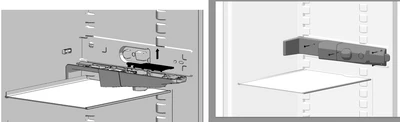
We facing the issue in Creo Illustrate that caused by OOTB Light scenes the object color appear grey due to shadow effects.
For getting an adequate Image we would to get rid of the lights (creating the shadow) and/or adjust a adopted Lights scene to have best result acc. appearance.
E.g. even that the left figure is not identical acc. part arrangement - the grey colored fridge frame is white, but appear due to light sceene grey. The right figure showing the expected result we want to achieve.
3. Are you using a workaround? If yes, please describe it.
Not at Creo Illustrate - manual rework in other graphic applications possible but time consuming and inefficient.
4. What is the use case for your organization? Describe how your idea would work in context or how it would apply to a practical situation.
Many illustrations should have an adequate appearance of the objects displayed.
Many documentations are created over the whole enterprise.
5. What impact does this problem currently have on your organization? (Number of users affected, hours of lost productivity, etc.)
Impact - rework with other graphics application Time and license cost)
The whole enterprise creating a lot of figures used in customers dicumentation. They might be several hundreds of documentation engineers which beed affected every day.