
Creo Illustrate lacks the ability to reorder callouts and inserts
Please include detailed documentation such as screenshots, images or video.
1. What product and version are you running?
We are using Creo Illustrate 8.1, 9.1, 10.1 & 11.0
2. What is the problem?
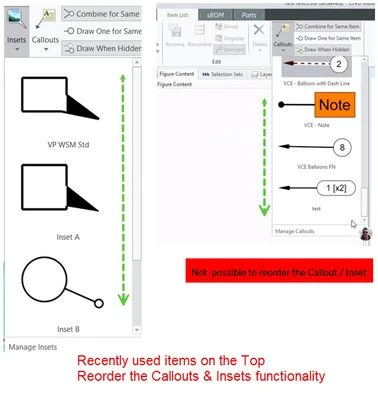
Creo Illustrate users are facing limitations in organizing and managing annotations, such as Insets and Callouts. The current interface displays new templates at the bottom, and there is no option to change the order of these annotations. This lack of flexibility can hinder efficiency and workflow for users who need to frequently access and modify annotations.
3. Are you using a workaround? If yes, please describe it.
We don't have any workaround.
4. What is the use case for your organization? Describe how your idea would work in context or how it would apply to a practical situation.
We use many custom Callouts & Insets. The current GUI in Creo Illustrate displays annotations (Insets, Callouts, etc.) in a fixed order, with new templates added to the bottom. There is no option to change this order. To enhance usability, consider allowing users to reorder callouts and inserts either by placing newly created callouts first or by prioritizing recently used ones.
5. What impact does this problem currently have on your organization? (Number of users affected, hours of lost productivity, etc.)
- Reduced Productivity: The inability to reorder annotations can lead to increased search time and decreased efficiency, especially for complex projects with numerous annotations.
- Errors and Omissions: Users may overlook or accidentally use wrong Callouts & Inset, leading to errors and potential quality issues.