
Creo Illustrate - ITM List Numbering
Please include detailed documentation such as screenshots, images or video.
1. What product and version are you running?
Creo Illustrate 11.0.0.0
2. What is the problem?
Would like to see a way to assign a number to the ITM list when renumbering, vice having to click the "Sequence Number UP/DOWN" buttons numerous times to get the number I need.
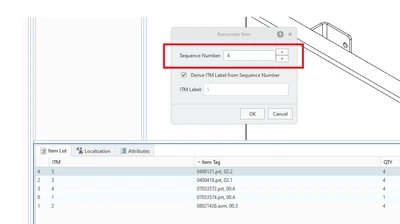
On a small illustration it is not too bad, but on a large illustration, it is a production killer and very time consuming.
3. Are you using a workaround? If yes, please describe it.
No, currently have to click up/down numerous times.
4. What is the use case for your organization? Describe how your idea would work in context or how it would apply to a practical situation.
This would allow illustrators to quickly assign the sequence number, vice clicking UP/DOWN. In the image above, I need to number it to Sequence "0" so it will have ITM "1". I need to click the down arrow four times to get the sequence number to 0.
If I could highlight the Sequence "4" and type in "0", that saves me an enormous amount of time.
5. What impact does this problem currently have on your organization? (Number of users affected, hours of lost productivity, etc.)
Numerous hours consumed clicking up/down. Three users working on numerous illustrations. Some illustrations have over 100 items. If I have an item that was imported from the SBOM as Sequence # 116, but need to change it to Sequence # 13, then I have to click the down arrow over 110 times to get to the correct Sequence #. Being able to highlight the 116 and type in 13 would be an enormous time saver.