Apr 12, 2023 1:21 PM UTC
Acknowledged

Creo Illustrate: Hatch lines on cutting planes

1. Describe your environment: What is your industry? What is your role in your organization? Describe your stakeholders.
Cummins-- power generation, engines, transfer switches, engineers, technicians. Manual imagery.


2. What product and version are you currently running?
Creo Illustraet 9

3. Describe the problem you are trying to solve. Please include detailed documentation such as screenshots, images or video.

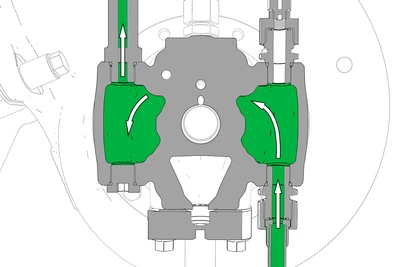
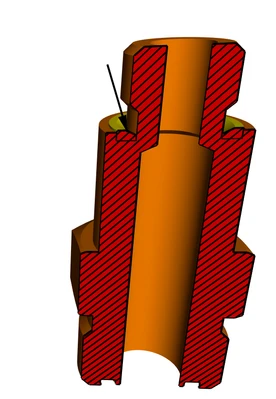
Current cutting planes:
kdgrandbois_0-1681305448496.png


kdgrandbois_1-1681305448510.png


4. What is the use case for your organization?

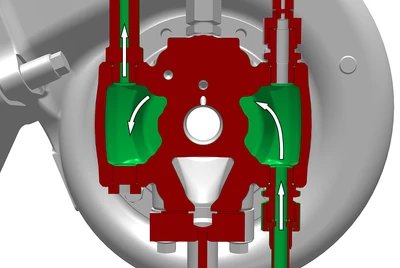
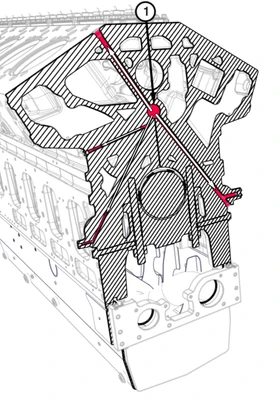
Desired cutting planes (examples made using solidworks composer)—angle and thickness of the hatching lines are adjustable:
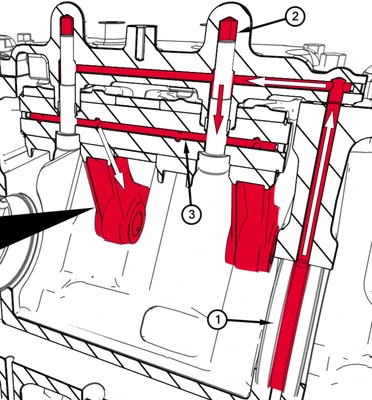
kdgrandbois_2-1681305513647.png


kdgrandbois_3-1681305513657.png


kdgrandbois_4-1681305513661.png


5. What business value would your suggestion represent for your organization?
The cutting plane having hatch lines would make the image much more clear when a cutting plane is used. This could improve clarity and reduce the errors done when using the manuals.


9 replies

Apr 12, 2023 1:27 PM UTC
Status changed to: Acknowledged

Hi @kdgrandbois!

Thank you for your idea. Based on the information you provided, we are acknowledging it as the Community management team. This is not a commitment from the Product team. Other users may comment and vote your idea up.

May 12, 2023 1:07 PM UTC

How is it possible that this feature request is not already 20 years old and has 10,000+ upvotes?

The ability to hatch cut surfaces and having them exported as vectors when saving to PDF is greatly needed!


20355, Schnitt mit Schraffuren.png

May 12, 2023 1:12 PM UTC
May 12, 2023 1:54 PM UTC

I seriously need this feature. The art suffers without it. This way of doing things is based on people being so engaged on the community and winning a popularity contest. Who has time for this?? This is a basic feature in other illustration programs and is just 1 of a handful of reasons why people will prefer solidworks composer to creo illustrate. How do I get more votes on this if I don't have a huge network of people already on this community?

May 12, 2023 2:19 PM UTC

Here's my opinion of all of the Ideas (I use Creo Parametric, all day, every day, with a dash of windchill pdmlink and Creo View)

They don't work.

The way you get enhancements is either thru the technical committees or you have contacts with the appropriate product managers at PTC and you can make your case more directly. Unfortunately having these contacts is "usually" because your company/corporation owns a lot of licenses so you have some influence.

Again, then is strictly my personal opinion and doesn't represent any other entity I am associated with..

May 12, 2023 2:31 PM UTC

Here is the gruesome wurgaround of how I create vector hatches as a user of PTC software.


I export my section view as a PDF, for example from Creo View.


I open the PDF in Inkscape. There, I have spent days creating vector hatching with different hatch widths and directions. I manually fill these into each individual cut surface of the PDF drawing using the Inkscape fill bucket.


Then I export the PDF from Inkscape, and continue to process it in my workflow.


Having to do it like this is absolutely ridoncoulus.

May 12, 2023 2:36 PM UTC

VecTor,

I appreciate your input. I have people using Photoshop after creating png's out of Creo Illustrate and adding in hatch lines for a lot of these cases. It's unnecessarily complicated and usually I discourage it out of respect for my illustrators.

May 12, 2023 2:47 PM UTC

@VecTor Indeed, gruesome and ridonculus. The things we do sometimes to make it the way it is expected to be.

Dec 20, 2023 4:17 PM UTC

Edit: wrong thread, can be deleted