
Jun 25, 2024 5:00 PM UTC
Acknowledged

Creating a orientation/view using normal to a selected surface like in Creo Parametric

Please include detailed documentation such as screenshots, images or video.

1. What product and version are you running?
Creo View 11


2. What is the problem?
Add "View Normal command" like in Creo Parametric, because in some pieces and assemblies it is necessary.
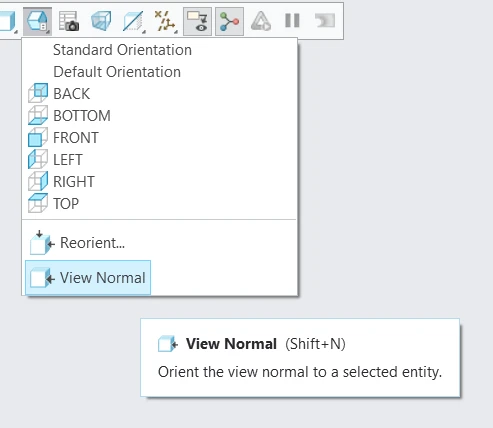
normal.png
3. Are you using a workaround? If yes, please describe it.
no

4. What is the use case for your organization? Describe how your idea would work in context or how it would apply to a practical situation.
With Creo View you are verifying distances and you want to orient your view normal to a face to check the gap between 2 faces....


5. What impact does this problem currently have on your organization? (Number of users affected, hours of lost productivity, etc.)
Affects all the users of Creo parametric, not only my organization, also all the suppliers that only have Creo View.

3 replies

Community Manager
Jun 26, 2024 3:40 PM UTC
Status changed to: Acknowledged

Thank you @Trebla for your idea. Based on the information you provided, we are acknowledging it as the Community management team. This is not a commitment from the Product team. Other users may comment and vote your idea up.

Jun 28, 2024 2:55 PM UTC

We've been wanting a way to do this in Creo View for a long time and wondered if we were just missing how to do it, since it's a very basic function/need.  There are more use cases than described above.  As for affects, if this is not available, it detracts from industry efforts to use more MBD 3D visualization across an MBE lifecycle, making users less interested to transition from 2D to more 3D (for non-designers).  We won't be to Creo or CV 11 for a while, so we hope this gets implemented in 11 and even earlier versions.

Jul 15, 2025 8:30 AM UTC

Please implement this functionality in Creo Illustrate as well. It really is essential for creating illustrations.