
Changing all step descriptions from a sequence at once
1. Describe your environment: What is your industry? What is your role in your organization? Describe your stakeholders.
Industry: pharmaceutical machinery industry
Role: senior developer augmented reality
Stakeholders: our customers, pharma companies
2. What version of the software are you running?
Creo Illustrate 9.0 creating animations and importing them to
Vuforia Studio 9.9.0
3. What is the problem?
Step descriptions within a sequence are automatically called “step 1” with iterating numbers. When a new step is inserted at the beginning it will be named after the last step. Now all 52 following steps after step 3 have to be renamed.
The naming is very important, since it is used to assign instructions and pictures in vuforia studio.
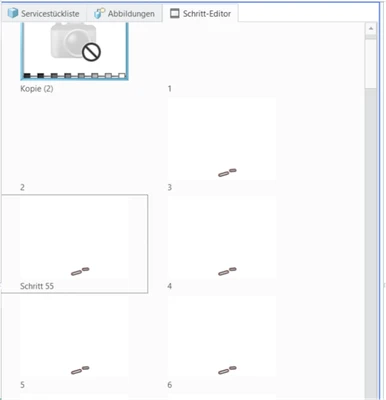
Solution: An automated process where Illustrate renames all steps after a scheme defined by author, e.g. [step 1, step 2, step 3] or [1,2,3,].
It could look something like this:
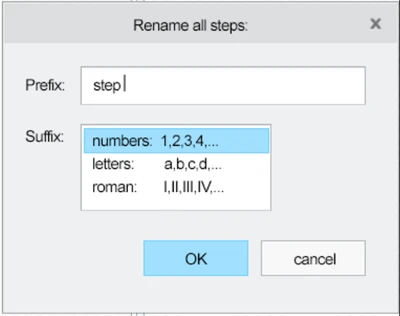
4. What is the use case for your organization?
Creo Illustrate is used to create instructions for our customers in augmented reality. The step numbers are used for assigning instruction texts and pictures and changing the step order.
5. What business value would your suggestion represent for your organization?
Renaming an instruction with 50 steps costs 4 minutes. This process has to be done for each sequence and its inverted version. 4 minutes can be reduced to 10 seconds, or 1hour to 2,5 minutes. Also, to be honest, it is quite a sisyphean task.