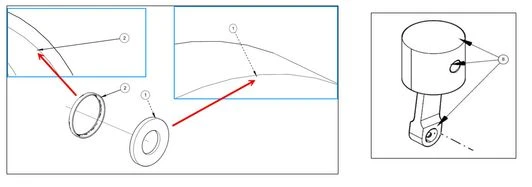
Callout Arrowhead is not aligning to geometry contour
Please include detailed documentation such as screenshots, images or video.
1. What product and version are you running?
We are using Creo Illustrate 8.1, 9.1, 10.1 & 11.0
2. What is the problem?
Callout Arrowhead is not aligning to geometry contour but crossing it
3. Are you using a workaround? If yes, please describe it.
We don't have any workaround
4. What is the use case for your organization? Describe how your idea would work in context or how it would apply to a practical situation.
Creo Illustrate users are experiencing difficulties with callout arrowhead in 3D figures. These arrowheads often do not align accurately to the contour of the geometry, instead crossing over it. This misalignment makes it challenging to precisely position callouts and can impact the clarity and accuracy of technical illustrations.
5. What impact does this problem currently have on your organization? (Number of users affected, hours of lost productivity, etc.)
Impact of Misaligned Callout arrowhead in Creo Illustrate
- Decreased Accuracy and Clarity:
- Misleading Information: Incorrectly placed callouts can lead to misunderstandings and misinterpretations of the 3D model.
- Reduced Visual Appeal: Misaligned leader lines can detract from the overall aesthetic quality of the technical illustration.
- Increased Design and Review Time:
- Manual Adjustments: Manually adjusting leader lines to ensure proper alignment is time-consuming.
- Iterative Process: Multiple revisions may be required to achieve accurate placement, delaying the design and review process.