
Jun 25, 2025 9:54 AM UTC
Acknowledged

Alignment of insets

Please include detailed documentation such as screenshots, images or video.

1. What product and version are you running?
Creo Illustrate 11.1.0.1


2. What is the problem?
Alignment of insets is missing.
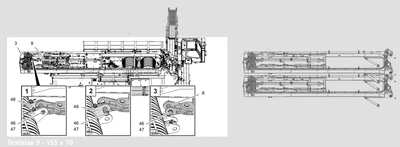
CI-Multi-insets.png


3. Are you using a workaround? If yes, please describe it.
No workaround available in Illustrate.

4. What is the use case for your organization? Describe how your idea would work in context or how it would apply to a practical situation.
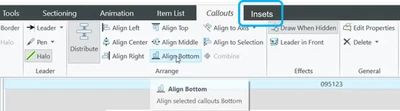
CI-Alignment-insets.png

An alignment function for inserts is required, as is already implemented for callouts in 3D figures.


5. What impact does this problem currently have on your organization? (Number of users affected, hours of lost productivity, etc.)
It affects 25 concurrent daily users.

5 replies

Community Manager
Jun 26, 2025 1:06 PM UTC
Status changed to: Clarification Needed

Thank you @Mike_10477878 for publishing your idea. However, we need more information as specified in the form you saw in the submission process. You may simply add a comment to your idea. The more details and context you give to document your idea, the better. Think about ways to educate and convince other Community members to support your idea and present your case to the product management team for consideration.

Please let us know within the next two weeks.

Additionally, I invite you to check out this topic where PTC executives explain product managers' approach to customer ideas and input for product roadmaps.

Please see examples of well-documented ideas:

Enhancements for Insets in Creo Illustrate: Beyond... - PTC Community 

Explode STEP files & other converted models in Cre... - PTC Community 

2D scalable vector symbols with Halos - PTC Community 

Inability of Creo Illustrate to produce 3D figures... - PTC Community 

Jun 27, 2025 10:02 AM UTC

Hi all,
Additional information on point "2. What's the problem?"
The alignment of the inserts is missing. Currently, this can only be done manually. This means additional work.

CI-Alignment-insets-4.png

Community Manager
Jun 30, 2025 1:18 PM UTC
Status changed to: Acknowledged

Thank you @Mike_10477878 for your idea. Based on the information you provided, we are acknowledging it as the Community management team. This is not a commitment from the Product team. Other users may comment and vote your idea up.

Jul 16, 2025 6:07 AM UTC

Hello Mike

How dou you manage to have your insets show different scenes in your screenshot "CI-Muliti_Insets"?
One of the biggest disadvantages with insets for me is that they are just a magnified version of the assembly.

With large assemblies and limited space I'd prefer the keep the assembly as is and show the exploded parts in the inset only.

In that screenshot you show three differently positioned explosions while the assembly is in intact, please elaborate.


Thank you very much

Jul 16, 2025 8:44 AM UTC

Hi all,
You have more than one dataset.
Inset [1] was generated from the main model (data set 1, Inset 1)
Inset [2] was generated from dataset 2 (Inset 2)
Inset [3] was generated from dataset 3 (Inset 3)
Regards, Mike
Insets with multiple statuses.PNG