
Adding light and Changing its position isn't very user-friendly in Creo Illustrate
Please include detailed documentation such as screenshots, images or video.
1. What product and version are you running?
We are using Creo Illustrate 8.1, 9.1, 10.1 & 11.0
2. What is the problem?
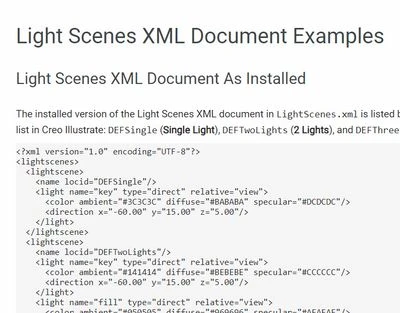
General users of Creo Illustrate face significant challenges in modifying and positioning lights for their illustration, as this process requires specialized coding skills to manipulate Light Scenes XML.
Modifying the XML file to change or add lights requires technical skills, creating a barrier for users without coding experience.
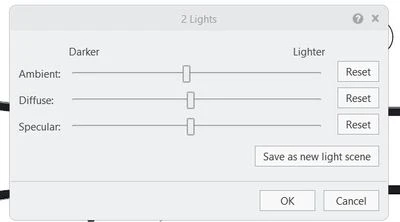
The UI-based light settings in Creo Illustrate do not allow users to reposition lights or add new ones in desired locations, limiting flexibility in lighting adjustments.
3. Are you using a workaround? If yes, please describe it.
No workaround available
4. What is the use case for your organization? Describe how your idea would work in context or how it would apply to a practical situation.
Use Case: A illustrator working on a technical document needs to create various lighting scenarios to showcase its features and aesthetics. Illustrator wants to experiment with different light positions and intensities to achieve the desired visual impact.
Current Process: Illustrator would need to:
- Learn coding: Acquire the necessary coding skills to manipulate Light Scenes XML.
- Write code: Manually create and modify XML code to define the desired light settings.
- Test and iterate: Test the lighting changes and make adjustments as needed.
Challenges:
- Time-consuming: Learning coding and writing XML can be a lengthy and complex process.
- Error-prone: Manual coding introduces the risk of errors that may affect the lighting functionality.
- Limited flexibility: The Illustrator may be constrained in their ability to explore different lighting options due to the complexity of coding.
Desired Outcome:
- Intuitive interface: A user-friendly interface that allows illustrators to modify light settings without requiring coding knowledge.
- Visual tools: Tools that enable illustrators to easily manipulate light positions, intensities, and colors.
- Pre-defined scenarios: A library of pre-defined lighting scenarios to accelerate the illustration process.
5. What impact does this problem currently have on your organization? (Number of users affected, hours of lost productivity, etc.)
500+ users are impacted
Inefficient Design Process:
- Time-consuming modifications
- Skill dependency
- Error-prone
Limited Design Flexibility:
- Restricted lighting options
- Design constraints
- Reduced creativity
Increased Costs:
- Training and skill acquisition
- External resources
- Project delays