
Add tree columns in Creo Illustrate like in Creo View
Please include detailed documentation such as screenshots, images or video.
1. What product and version are you running?
Creo Illustrate 11.0
2. What is the problem?
We need more information in the model tree, like description, material, treatment, etc...
3. Are you using a workaround? If yes, please describe it.
I need to customize General / Navigation with the "Use alternate part name" option to see attributes in the model tree. It's not easy to read.
4. What is the use case for your organization? Describe how your idea would work in context or how it would apply to a practical situation.
OOTB version shows file names, that in our environment are progressive numbers, not useful.
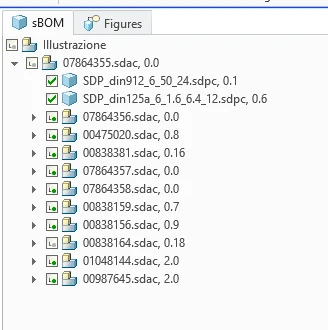
We changed the "Use alternate part name" to add information but it's not very easy to use, for alignment, for some level without values, etc.
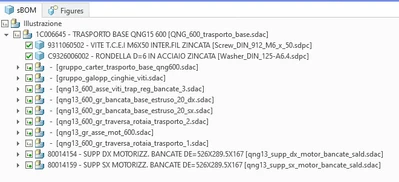
In creo view instead there are "tree columns", I'ts very useful!

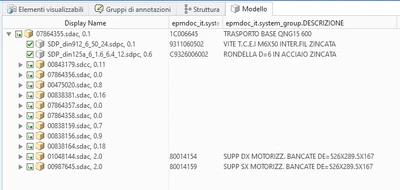
We would like to see this feature also in Creo Illustrate.
5. What impact does this problem currently have on your organization? (Number of users affected, hours of lost productivity, etc.)
I can't quantify it.