
Add smart stamps for side views in Creo Illustrate - Schematic
1. Describe your environment: What is your industry? What is your role in your organization? Describe your stakeholders.
Marine
2. What product and version are you currently running?
currently evaluating creo illustrate/schematics
3. Describe the problem you are trying to solve. Please include detailed documentation such as screenshots, images or video.
Add side shapes and pinout profiles with logical referencing from the connector!
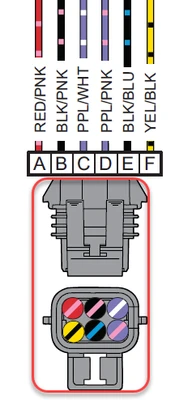
In this schematic layout you could select the connector then right mouse button and choose ADD STAMP > SIDE1 VIEW, SIDE 2 VIEW or PIN OUT VIEW.
Using the logical reference of the connector model_name you would pull in the side or pin out view you have stored in your library. (can be defined thru xml or simply found in a stamp folder)
If a Pin out view is called, you can use the wire colors in the ports to define the colored circles automatically. OR select on a circle and then choose the wire above for the color you want placed there.
4. What is the use case for your organization?
speed up documentation creation
5. What business value would your suggestion represent for your organization?
high, but it would benefit all schematic users