
Add options to change the background color of the selected objects in the model Tree
Please include detailed documentation such as screenshots, images or video.
1. What product and version are you running?
Creo View 10.1
2. What is the problem?
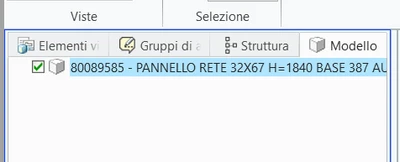
Some users would like to customize background colors in the model tree for the selected objects. Now the color is this (selecting direcly in the model tree):
And this when the selection is made on 3d:
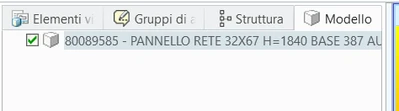
Many colors are customizable...is not clear why these 2 not.
3. Are you using a workaround? If yes, please describe it.
No workaround availables.
4. What is the use case for your organization? Describe how your idea would work in context or how it would apply to a practical situation.
We are using Creo View in our Production Warehouse, where the visibility is not perfect, monitors are of low quality, we need more contrast in color to highligh selected parts.
5. What impact does this problem currently have on your organization? (Number of users affected, hours of lost productivity, etc.)
10 users, production users.