
Jun 14, 2016 10:28 AM UTC

Easy Material Assignment

You can now assign material directly from the Model Tree or graphics area, by selecting the component and using the Right Mouse Button (RMB) menu and clicking Add Material.

If the Materials node is already visible in the Model Tree, you can also activate the RMB menu from any of the available materials to edit or assign.

Check the below images and video.
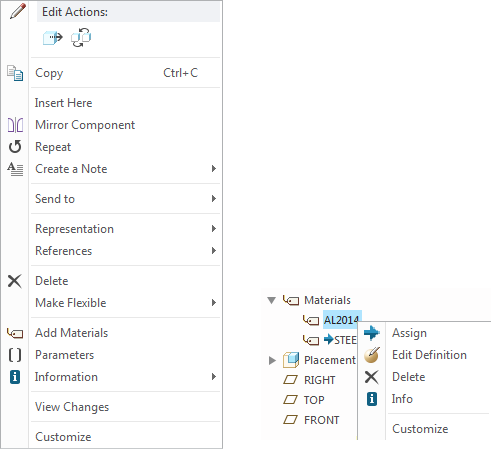
add-material.png

3 replies

Jun 16, 2016 10:23 PM UTC

One of the presentations talked about 100 new material files that will be available in Creo 4.0. Are those available in the Sneak Peek?

Jun 17, 2016 11:37 AM UTC

Hey Adam,

The new standard material files are not yet in the system and thus not available in SneakPeek.  We are finalizing the specific materials with our partner and will include these in the production release later in the year.  If you have specific questions about them, you can always email me at -.

Regards,

Mark

Jun 18, 2016 1:40 AM UTC

what version of CREO do you need to do the add Materail?