
Windchill Status and Windchill Actions for Creo Drawings
1. Describe the Problem
When Creo Parametric is connected to a Windchill session, the 3D model tree automatically gets the super helpful Windchill status column. This helps users understand statuses like Checked Out, Out of Date, etc without having to constantly check the Workspace. Unfortunately, there's no similar functionality for 2D drawings. Please add the same ability for 2D drawings so users can quickly know if the drawing is Checked Out, Out of Date, etc. without having to track it down in the workspace.
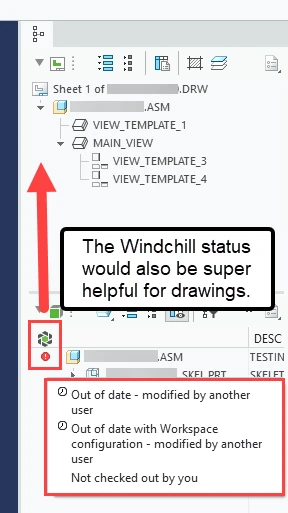
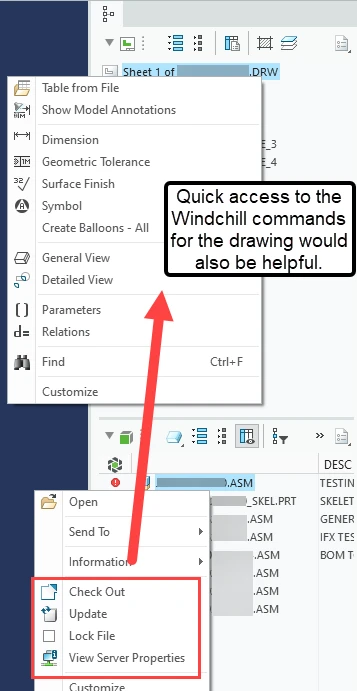
It would also be helpful to have the Windchill actions (Check out, Update, Lock File, etc.) available via right click in the drawing model tree.
2. Are you using a workaround?
User has to manually check their workspace for this information which can take 30 seconds or more if there's a lot of objects in the workspace. User's often forget to check. We've added a custom Windchill tab to help with the lack of Windchill quick actions. We added the following buttons: Check Out, Save and Upload, Update Current, Undo Check Out, and View Server Properties.
3. What is the use case for your organization?
Helping users know if the the local version of a drawing is out of date and needs to be updated. Quickly perform Windchill actions on the drawing. Same reasons PTC added the Windchill status and right click actions into the 3D model.
4. What impact does this problem currently have on your organization?
Users looking at out of date drawings without realizing it. Extra time to update, undo check out, etc. Having to customize the Creo UI to display Windchill actions.