
Aug 24, 2018 1:37 PM UTC
Archived

View the contents of the Workspace after activating it.

Related products:Creo Parametric

In Creo session linked to Windchill, when changing the Workspace, it would be very useful to display the content of this Workspace.

Currently, after the activation command followed by confirmation of the activation, the activated workspace content is not displayed. The previous inactive Workspace is displayed. You must click on the Workspace a second time to display the active content.
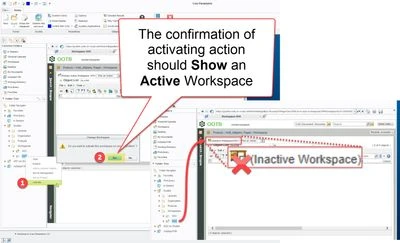
 

Show active WS.jpg

4 replies

Aug 24, 2018 2:07 PM UTC

I agree. I usually get around this by going to the inactive workspace first and then activating it but it's still the same extra clicks either way, just in a different order.

Aug 24, 2018 2:59 PM UTC

Hello Stephen,

There is a multitude of ways to activate another workspace but none display the content directly.

What is annoying is to let a user think-believe that he is viewing active information.

We have more and more issues related to inactive workspaces. Many calls with logs requests by PTC to handle these cases have been open these last months.

Thanks for your vote

++

Nicolas

Aug 24, 2018 4:16 PM UTC

Here is an alternative to using the right button to activate and show the content of an activated Workspace.


alternative to using the right button.jpg

olivierlp
Community Manager
Oct 3, 2022 12:48 PM UTC
Status changed to: Archived

Hello,

We are archiving your idea as part of a general review. This action is based on the age of your idea and the total number of votes received, as per this announcement.

You can always post a new idea with all the details required in the form.

Thank you for your participation.

Olivier