
Aug 1, 2019 12:15 PM UTC
Acknowledged

Update icons to show version number

Related products:Creo Parametric

Currently when you install Creo the icons for all versions are identical (so the Creo 5 icon is the same as Creo 6 etc). If you have multiple versions installed this can - and does - lead to simple errors opening the wrong version and occasionally results in files being updated to the new version.


A very simple solution - which SolidWorks and other CAD vendors use - is to add the version text to the Icon. So rather than just a simple box with a blue box, have a box with 6 in it, or 5 -you get the idea. Maybe even change the colours as well? Or just change the icons between versions. Anything is better than the current confusion.


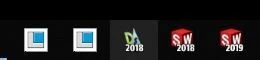
The problem is illustrated below showing a screenshot from my taskbar - Creo 5, Creo 6, draftsight 2018, SolidWorks 2018, SolidWorks 2019.
 

icons.JPG


Those of us that use multiple versions would find this extremely helpful - and it is a very simple change to implement.


5 replies

Aug 1, 2019 3:56 PM UTC

Since we use a network install, the icons have to be created as a shortcut on everyone's desktop. When I create the shortcut, I just rename the icon text to Creo 4 m080. Simple and easy.


KQDAuthor
Aug 1, 2019 4:02 PM UTC
That's true but it is not exactly hard to redesign an desktop icon for a major release - like most of the competitors do. In my view, anything that makes the user's life easier is needed - installing this software is hard enough 🙂
Mar 22, 2021 6:51 AM UTC

This is a very important request, which already exists in almost all software

Apr 30, 2021 5:46 PM UTC

Agree with @KQD and @YY_8922822, an icon isn't a big ask and much easier to ID.

Community Manager
Feb 12, 2025 10:52 AM UTC
Status changed to: Acknowledged

Hello,

Thank you for your idea. Based on the details and popularity of your idea, we are acknowledging it as the Community management team. This is not a commitment from the Product team.