
Mar 4, 2022 10:52 PM UTC
Acknowledged

Unused Models in Drawings

Related products:Creo Parametric

1. Describe your environment: What is your industry? What is your role in your organization? Describe your stakeholders.
Design systems / assemblies to address client challenges - from initial concept to delivering final product.


2. What version of Creo Parametric are you currently running?
8

3. Describe the problem you are trying to solve. Please include detailed documentation such as screenshots, images or video.

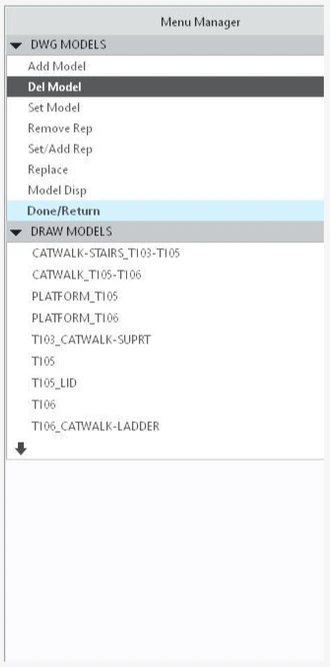
Unused models in drawings can only be deleted one-at-a-time from within the drawing and are only accessible from an old antiquated DOS-like menu.  Unused models can accumulate from drawing revisions and if a drawing is copied and views are edited.  You may not even know you have unused models that are taking up memory.  And if you do know there are unused models in your drawing, it takes an inefficient use of effort and time to remove them.  Modelcheck can be used to strip unused models from a drawing, but that's another step that shouldn't be necessary.  Suggestion:  Modernize the drawing model selection menu and add the ability to select multiple unused models to delete and/or the ability to delete all the unused models at once.
 

olivierlp_0-1646655810321.png


4. What is the use case for your organization?

Unnecessarily excessive file size uses additional file space and takes time during the drawing phase to manage.


5. What business value would your suggestion represent for your organization?
More efficient use of file storage space and less time necessary for a project.

6 replies

olivierlp
Community Manager
Mar 7, 2022 12:24 PM UTC
Status changed to: Acknowledged
Olivier
olivierlp
Community Manager
Mar 7, 2022 12:24 PM UTC

Hello, 

Thank you for your idea and the information you provided.

Olivier
Jul 1, 2023 8:27 AM UTC

Hi @Aaron_Daniel 

Did you try the config,pro option cleanup_drawing_dependencies?

More information in this thread

May 29, 2025 5:57 AM UTC

1. Describe the Problem

In drawings, if the added model is not used on the drawing sheet, it will result in a constant association between the model and the drawing. It is easy to cause the relevant object page of plm system to appear when checked into the system. Redundant models need to be deleted and re-checked in. However, when there are many models, they can only be deleted one by one, which is very inconvenient. It is hoped that multiple batch deletions can be supported. Another suggestion is to add some obvious prompts to inform users of the existence of redundant models, so that users can detect them early. The command menu is located at: Drawing > Layout > Drawing Model > Delete Model Modelcheck might be one solution. However, for the majority of Creo users, it is not a straightforward approach and it's not very humanized.


2. Are you using a workaround?
N/A

3. What is the use case for your organization?
N/A

4. What impact does this problem currently have on your organization?
N/A

Jun 2, 2025 11:15 PM UTC

I agree with a warning on first Save operation if an added model was not used to provide views for a drawing.

Allow the possibility to prompt the user by displaying each model that was not used and if the user preferes to delete the model reference from the drawing before saving the drawing.