
Jun 29, 2023 12:37 PM UTC
Acknowledged

The undo checkout action from a Windchill browser, should not REMOVE object from the Creo Workspace

Related products:Creo Parametric

Please include detailed documentation such as screenshots, images or video.


1. What version of the software are you running?
Creo Parametric 8.0.8.0 and Windchill 12.0.2.12


2. What is the problem?

The Undo Checkout action from a Windchill browser REMOVES object from the Creo Parametric Workspace !


3. Are you using a workaround? If yes, please describe it.

Explaining to Creo Parametric users to not use the undo checkout action from a Windchill browser …
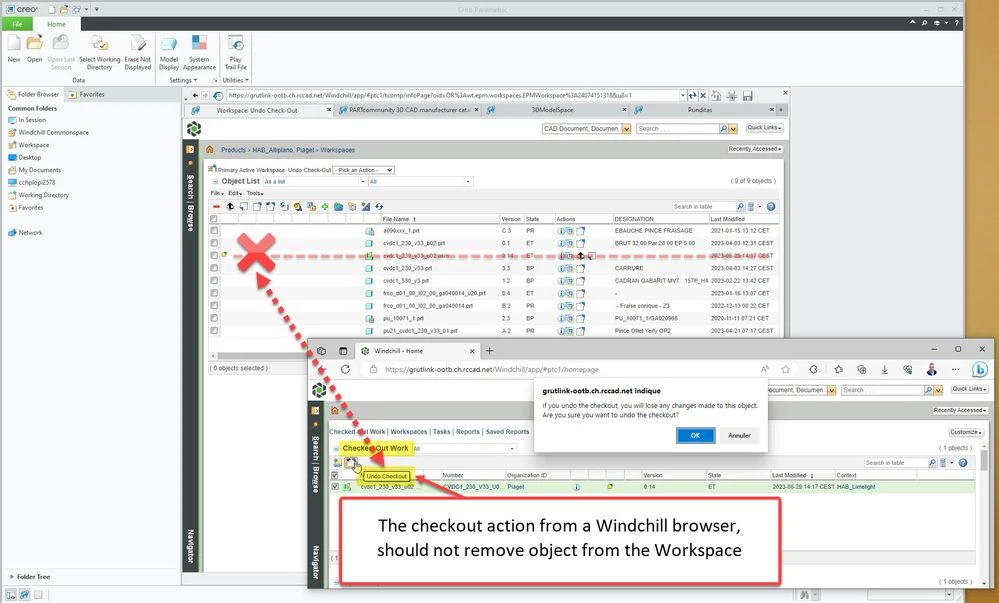

The checkout action from a Windchill browser should not remove object from the Workspace.jpg

3 replies

Jun 30, 2023 7:05 AM UTC
Status changed to: Acknowledged

Hi @NicolasBourgeoi1!

Thank you for your idea. Based on the information you provided, we are acknowledging it as the Community management team. This is not a commitment from the Product team. Other users may comment and vote your idea up.


However, I encourage you to elaborate a little bit more on what is the use case for your organization and how your idea would work in context or how it would apply to a practical situation.  What impact does this problem currently have on your organization? (Number of users affected, hours of lost productivity, etc.) 

Jul 4, 2023 9:31 AM UTC

Hello @achirila 

The impact is that Creo Parametric crashes (Traceback) afrer using the undo checkout action from a Windchill browser:

Case Details: 16940444 (ptc.com)


The "undo checkout action" should simply work the same way from the Browsers as it works when connected to Creo.

-> Ruse & Objets are not REMOVED !

Undo Check Out from Creo.jpg