
Oct 2, 2023 11:44 PM UTC
Acknowledged

The "References" menu interface needs enhanced to provide more options

Related products:Creo Parametric

Please include detailed documentation such as screenshots, images or video.

1. What product and version are you running?
Creo 8 and Creo 9


2. What is the problem?
The "References" menu needs additional control options to enable efficient workflows.  "Remove" and "Remove All" do not provide enough capability for large "reference sets"

3. Are you using a workaround? If yes, please describe it.
The only workaround is to do lots and lots of clicking.

4. What is the use case for your organization? Describe how your idea would work in context or how it would apply to a practical situation.
One example is if an annotation has references which get altered.  Especially in an environment where semantic references are defined.  Then is no way to only remove the failed references.  The user can only remove ALL the references, or go through the list one by one.     This issue applies within many contexts of Creo Parametric.    Another example is if a large round set is messed up 50% of they way, then the user has to choose, do I redo 50% of the original work, or do I individually remove 50% of my references?


The References interface should also support:

  • The screen area selection capability of Creo Parametric.
  • Bulk selection of references in the list using the common "Ctrl+LMB" and "Shift+LMB" practices.
  • "Select All Failed References" might be better then "Delete all Failed References"
  • Sorting the list by status
  • A nice stretch goal would be the ability to "Copy and Paste" references between annotations.  I could image a case in a semantically referenced model where some kind of important overlap might exist between surfaces.   (Surface Finish vs Anodize where is might be handy to not have to "reclick" a bunch of surfaces again, or maybe a similar note needs applied to a very similar copied model.)
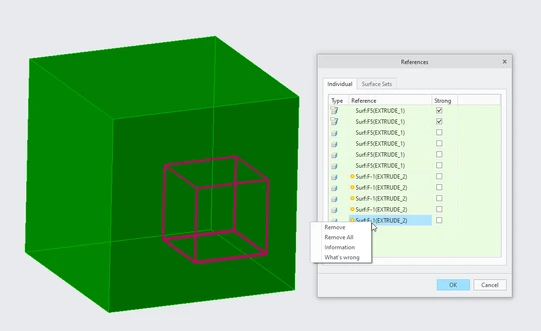
Failed References Example.png

5. What impact does this problem currently have on your organization? (Number of users affected, hours of lost productivity, etc.) 
It wastes a substantial amount of time which would not be needed with some minor software improvements.

10 replies

Oct 3, 2023 9:51 PM UTC

YES! Please PTC, CTRL and SHIFT selecting should be standard. Really like the other ideas, too.

Oct 27, 2023 10:27 AM UTC
Yes, that would be good a lot of times.In everyday work, I really miss select "All Failed References". The big vote went :)


Nov 28, 2023 10:05 AM UTC

@Mfridman This is functionality which would help with the adoption of MBD for the designers- with having to add semantic references already being more work- making it as easy as possible would be a great improvement. The below photos show what I usually would be able to select in a few mouse clicks- not hundreds which is the only work around. Engineers will simply not do this as it is a pain- and also very error prone.

AustinWhite_0-1701165703715.png

AustinWhite_1-1701165709062.png


Nov 28, 2023 10:39 AM UTC

Hi @AustinWhite and all,

The reference UI in your image is pre-Creo 8. In Creo 8.0 we have added another tab to this UI which allows advanced surface selections like seed-and-bound, intent surfaces, surfaces of all bodies etc. 

Mfridman_0-1701166734537.png


It is also possible to define a datum reference feature (intent surface based) that will collect references based on a geometrical rule e.g. all holes with a specific radius. once the datum reference is created, you may collect it as input for semantic references to any annotation (the semantic references UI allows you to pick this DRF). The nice thing here is that if new holes would be added to the model, the DRF would regenerate and update and therefor the semantic references of the annotations that are using this DRF, would get their reference list to update as well.

For a short demo about the surface sets collector that was added in Creo 8.0 for standalone annotations, please see: https://www.youtube.com/watch?v=ngg_mZQVd6w&list=PLzFpa6I9hCZW93OvK3d00KpOHLO2RJUCR&index=61 


In addition, here is a snapshot of how you may define a DRF that collects the surfaces of all the holes that are using the same radius. After creating this DRF I can add it to the semantic ref UI of the 25mm dimension:

DRF_Geometry_Rule.jpg


I agree that there are additional selection methods that we may consider for this UI for improved usability and time saving, but I mostly wanted to make sure that everyone on this post are aware of the already existing functionality for collecting semantic surfaces for annotations.


Nov 28, 2023 2:00 PM UTC

@Mfridman Thanks for getting back to me quickly. Great work- glad to see it's been implemented- Just what I was asking for and glad to hear that intent surfaces etc can be used, as they save a lot of time.


Quick improvement that I have thought of- having the same diameter is one thing- but there could be holes which have the same diameter but have different tolerances- or GD&T. so being able to select all holes with the same diameter and tolerance (including GD&T) would be a great feature to have.


Can one of the admin of the community change this thread to implemented?

Nov 28, 2023 2:27 PM UTC

Hi @AustinWhite ,

I think that you have raised an interesting suggestion for being able to search for a combination of a specific tolerance type/value in addition to a geometrical condition (diameter type in our example). This would be something that we would need think more deeply about and investigate.


Despite the already available advanced selection capabilities that I have mentioned earlier, I do think that this product idea should probably remain open (I have just updated it to a status of Acknowledged) as there are some interesting suggestions here, which talks about screen selection options (e.g. box selection), as well as the other improvements for the semantic reference UI

N.BarnesAuthor
Nov 28, 2023 2:33 PM UTC

@Mfridman, thanks for the demo video on the advanced features.  I'll experiment with those more.


And also, thanks for Acknowledging the request.    I think that additional controls on manual selection still has value in many cases.

N.BarnesAuthor
Apr 30, 2024 4:08 AM UTC

I did circle back an try to use the "advanced selection tools".  I feel like in "just the right" circumstances they are neat.   BUT..... box select and better ways to work with the selected and failed references would be be a big enhancement.  A zone select capability might be cool.   Or, a box select that only picks the first near side surfaces.   I want an elegant ways to brute force the issue.

Apr 30, 2024 7:12 PM UTC

@N.Barnes Box selection is one of the improvements announced for Creo 11. And with one cool feature, the possibility to only select visible surfaces. Also lasso selection, and trace selection.


But I don't know if the mentioned buttons to quickly remove failed references was implemented or not.


One capability that you mentioned that I think is very useful (specially for automated selection of surfaces) is the selection of surfaces within a radius distance to a point or axis, or within a cylinder or box (quilt or body) (this is the concept of zone, I guess).

N.BarnesAuthor
Jan 6, 2025 3:44 PM UTC

@Mfridman, FWIW.  When assigning references in an annotation in Creo 10 (and I think Creo 9) the Geometry References option is not available.


The geometry rule surfaces capability is neat in the Datum Reference Feature, but it I have to go somewhere else and make a new feature in the tree to use it.


I'll have to wait for Creo 11/12.  Unfortunately that will probably be at least a year out for us 😞

NBarnes_1-1736177624097.png