Jul 24, 2019 8:01 AM UTC
Archived

The copied and pasted text becomes the default character height

Related products:Creo Parametric

It is recommended that the character height that is pasted by copying the note character be the character height set in the note.
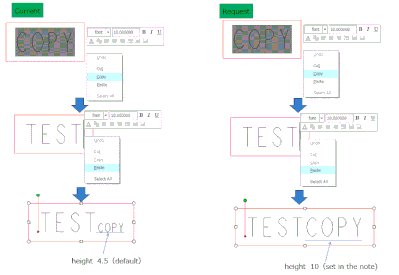

20190724.GIF

4 replies

Jul 24, 2019 1:01 PM UTC

Add this to copy and paste in a comment cell of a BOM table.

When I have a formatted cell and copy it, the pasted cell does not maintain the text formatting of the original cell.

Jul 26, 2019 6:04 PM UTC

See https://www.ptc.com/en/support/article?n=CS264560 This was the functionality in Creo 4.0 prior to Creo 4.0 M080. I requested PTC to add functionality like Microsoft where they give you options on how to paste information. PTC did not do this, instead they opted to change function back to the way paste worked in Creo 2.0.


We do not want our text font/character height changing on pre formatted notes unless specifically defining to do so.


Wayne Schrock 

kamsanfdAuthor
Jul 29, 2019 9:14 AM UTC

Dear Mr.Schrock


Thank you for useful information.

I understand that the Creo 4.0 M080 version can be copied and pasted in the same way as Creo 2.0.


I think that functionality like Microsoft will be added to Creo too.

However, it is a pity that it was rejected by PTC.

olivierlp
Community Manager
Oct 3, 2023 1:54 PM UTC
Status changed to: Archived

Hello,

We are archiving your idea as part of a general review. This action is based on the age of your idea and the total number of votes received, as per this announcement.

You can always post a new idea with all the details required in the form.

Thank you for your participation.

Olivier