
Jun 26, 2013 8:10 AM UTC
Archived

Systematically show the feature name of any feature when using any filter

Related products:Creo Parametric

It would be very useful to systematically show the feature names of any feature when using any filter.

Acually, the names of Quilt or Surface features are not shown when using Quilt or Geometry filters.

Show names of quilts, surfaces in selection fields -> Pick From List, UDF fields, ...
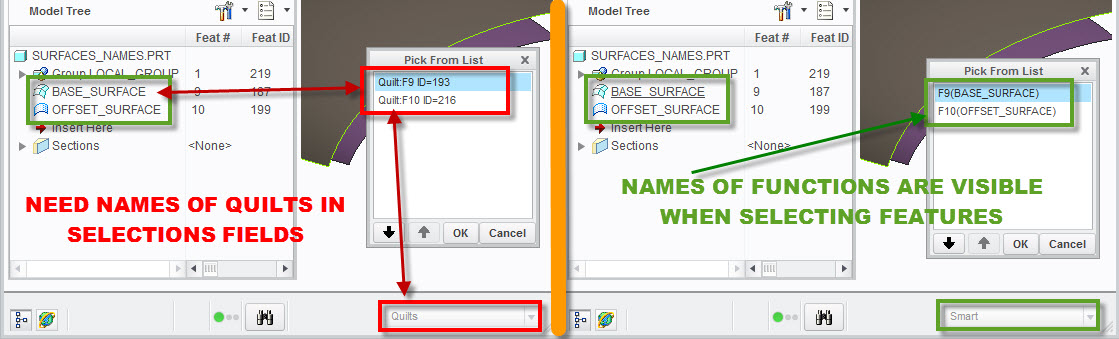
QUILT NAMES IN SELECTIONS.jpg

3 replies

Jun 1, 2015 3:42 PM UTC

Another example of this problem is that currently, the Pick from List does not show the name that the user has given to a feature, just the generic "type".  Why not show this name as that would make it so much easier to quickly zero-in on specific entities?

PICK_FROM_LIST_NAMING_CREO2.png

In this example A_2 axis is easy to select; However, when you have a lot of closely spaced items on the screen, identifying which axis to select from a list of "FXXX(PROTRUSION)" is not easy...  Wouldn't selecting an item called A_2(AXIS):F9("LARGER_DISC") be easier?

Jun 14, 2018 7:16 PM UTC
Status changed to: Acknowledged
olivierlp
Community Manager
Jan 4, 2022 2:11 PM UTC
Status changed to: Archived

Hello,

We are archiving your idea as part of a general review. This action is based on the age of your idea and the total number of votes received, as per this announcement.

You can always post a new idea with all the details required in the form.

Thank you for your participation.

Olivier